



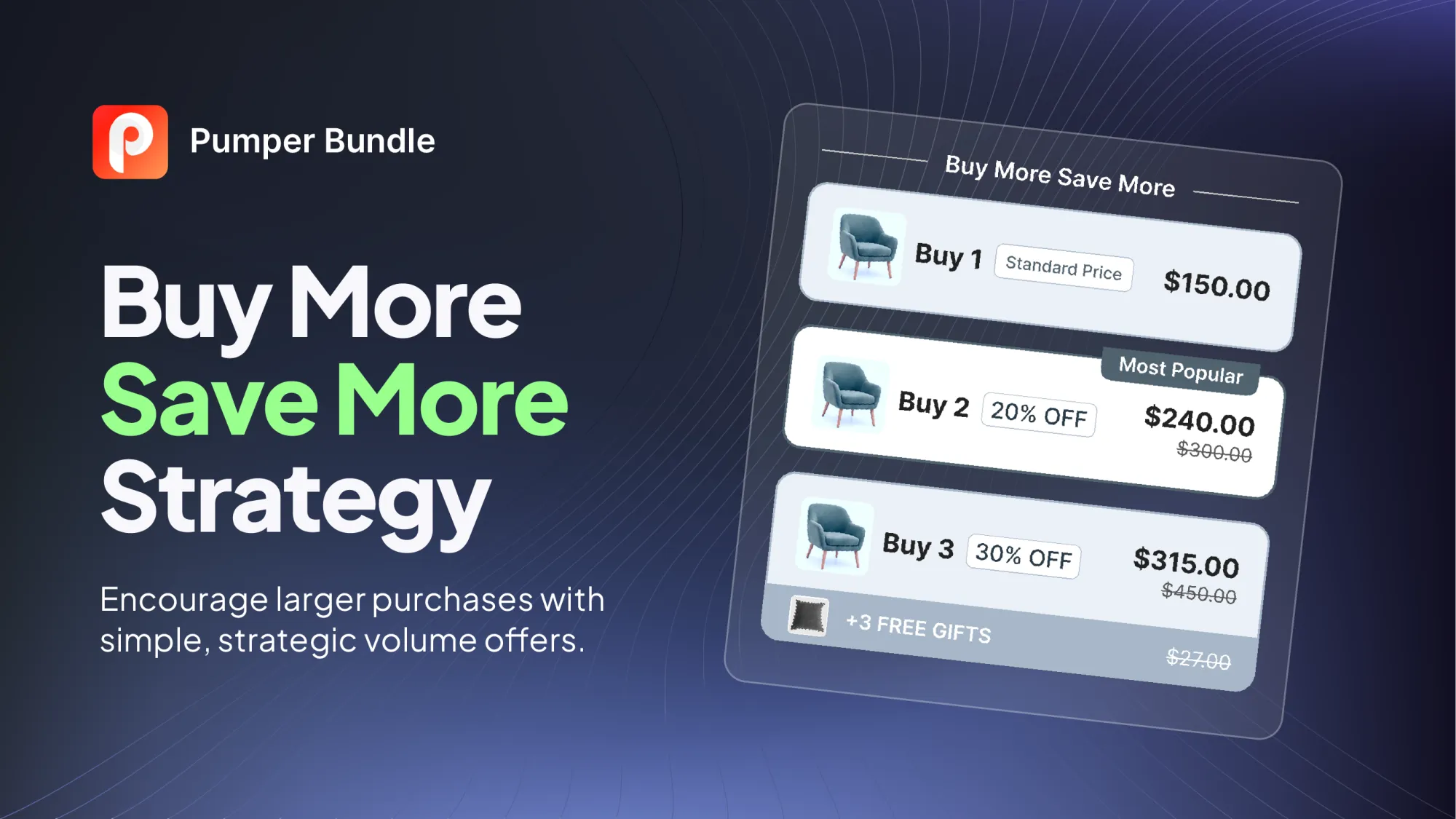
Most buy more save more offers on Shopify look the same: buy two, save 10%, buy three, save 15%. That single design is one point in a much larger space. The tier count, the discount mechanic, the thing the shopper unlocks, and the product the offer sits on all change what the offer does to your order value and your margin.
This guide lays out twelve distinct strategies, each with how it works, where it tends to break, and the number to watch once it's live. Some are structural choices about how a tier is priced. Others are add-ons that sit on top of a tier, like a free gift or a shipping threshold. You can run one on a single hero product or stack several, and the section near the end covers how to combine them without discounting yourself into a loss.
Key Takeaways
- Buy more save more is a family of at least twelve offer designs, not a single discount. Pick the design that matches your goal: bigger baskets, stock movement, repeat purchase, or a higher share of full-price sales.
- Baymard Institute's checkout research lists extra costs such as shipping, taxes, and fees as the top reason for abandonment, at 40% of shoppers in its list. A free-shipping tier targets that friction directly.
- A Marketing Science study of an online retailer found free-shipping thresholds generated extra sales but were unprofitable for that retailer. Treat a shipping tier as a cost to price in, not a freebie.
- Wertenbroch's 1998 Marketing Science research found buyers of impulse-prone goods respond less to quantity discounts than buyers of practical goods, so tier depth should vary by product type.
- Run one change at a time, and judge each strategy on profit per visitor and order value together.
What Buy More Save More Does for a Store
A buy more save more offer rewards a shopper for putting more in the cart. The shopper picks the quantity or spend, sees the savings climb, and the merchant gets a bigger order for a shallower discount than a store-wide sale would cost. Because the discount only applies to people who raise their order, it tends to price-discriminate in the merchant's favor: shoppers who would have bought one still pay full price.
The mechanism ties directly to average order value, which Shopify defines as gross sales minus discounts, divided by the number of orders. A strategy that lifts units per order raises the numerator faster than the discount lowers it, as long as the tier is priced above your cost. Pumper's guide to increasing average order value on Shopify maps seven levers and the product types that suit each, and buy more save more is the first on that list.
The twelve strategies below are grouped by what they change. The first four reshape the tier itself, the next five add something the shopper unlocks, and the last three adjust who sees the offer, which products it fits, and when it runs.
A Quick Map From Goal to Strategy
Four Strategies That Shape the Tier Itself
1. The Tier Ladder With a Chosen Default
The classic ladder lists quantities side by side, each with its own savings. Three tiers are the usual starting point: one unit at full price, a middle tier that does most of the work, and a larger tier for shoppers who want the best unit price.
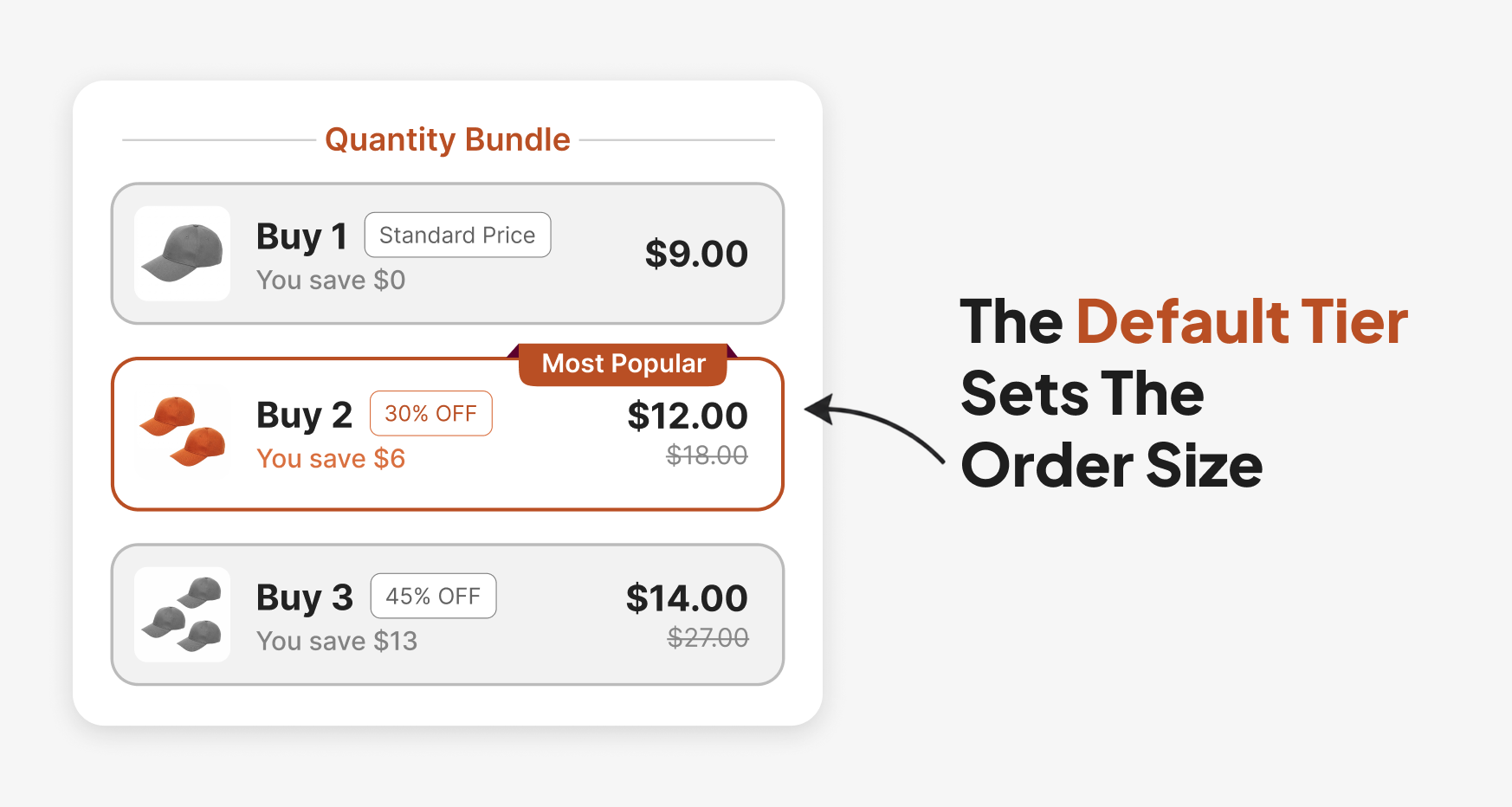
Two choices decide whether the ladder works. The first is which tier loads pre-selected. A shopper who lands on the page and presses Add to Cart without touching the widget buys whatever the default is, so a default on the middle tier sets your expected order size. Pumper lets you choose the default selected tier and add a tag such as "Most Popular" or "Best Value" to any of them.
The second choice is how many tiers you show. More tiers add clutter faster than they add revenue, and the discount depth for each rung deserves its own treatment, which Pumper's quantity break pricing guide covers from the marginal-cost side.
Where it breaks: a default on the largest tier can inflate the add-to-cart rate while also raising returns and complaints from shoppers who didn't notice the quantity. Watch: the share of orders landing on each tier, not only revenue.
2. Pick the Discount Mechanic That Fits the Price
The same saving can be shown four ways. It can be a percentage, a dollar amount off the total, a dollar amount off each unit, or a fixed price for the set such as "3 for $99." Pumper supports all four, plus a BOGO tier where the cheapest units are free.
The framing changes how big the saving feels. A Journal of Retailing study from 1998 tested price cuts framed as a percentage and as a dollar amount on high-price and low-price products. For the high-price product, shoppers found the dollar-framed reduction more significant, and the opposite held for the low-price product (Journal of Retailing, 1998).
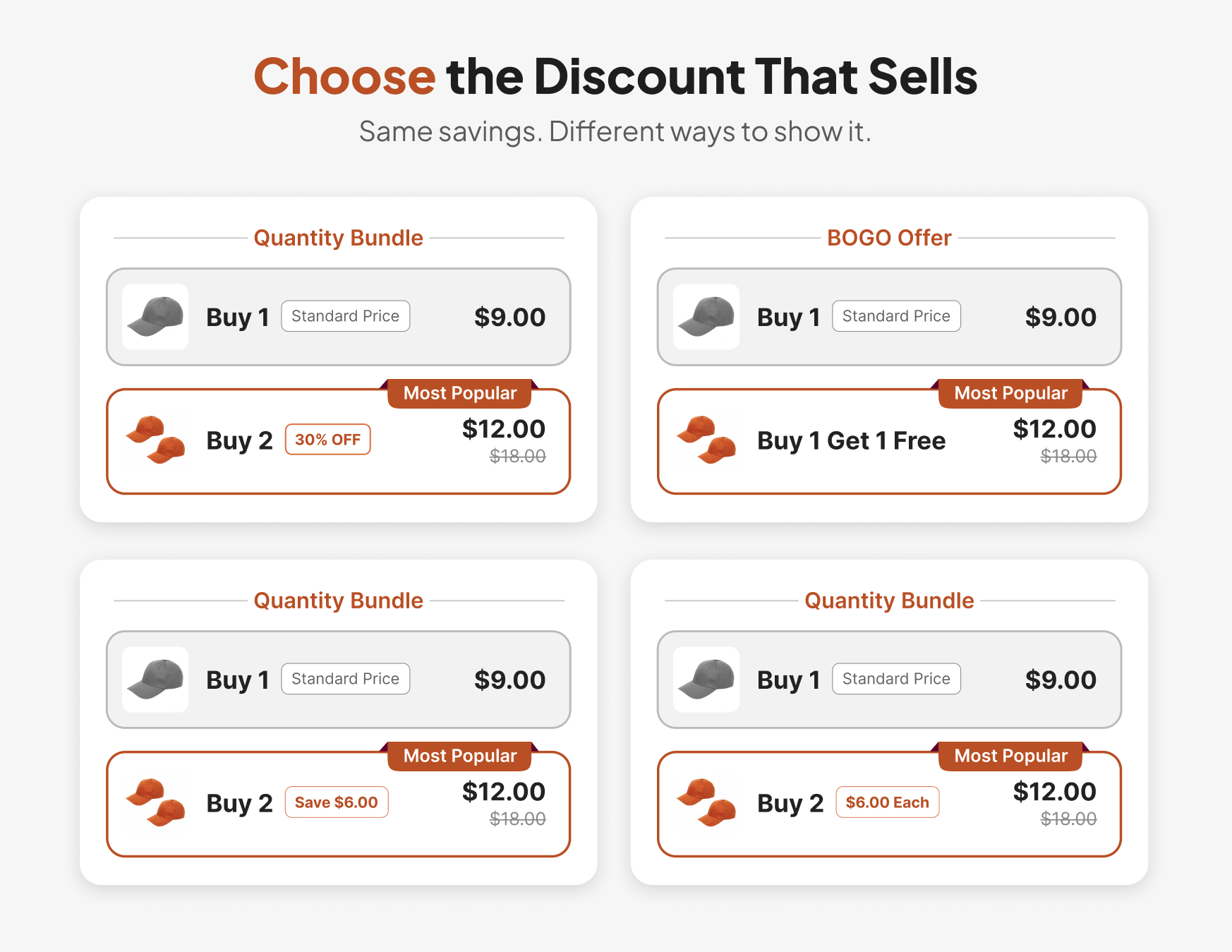
That gives you a working rule. Show a dollar saving on higher-priced products and a percentage on low-priced ones, and let a fixed set price carry the offer when the number itself is memorable. Pumper's dynamic variables, such as {Price}, {Savings}, and {BuyQuantity}, fill those figures into the widget text automatically so the copy stays accurate when you change a tier.
Where it breaks: a fixed price for a set hides the per-unit saving, which can make a two-unit tier look worse than it is. Pumper can show the per-item price next to the total, so a fixed set price still shows the unit saving. Watch: whether shoppers pick the tier you expected, and adjust the framing before you adjust the discount
3. Spend-Based Thresholds for Mixed Carts
Quantity tiers fit stores where shoppers buy several of one item. Stores with a wide catalog often do better with a spend threshold across the cart, such as an order discount that begins at a set subtotal.
Shopify's discount model separates product discounts, which apply to specific items, from order discounts, which apply to the whole order. A spend threshold is an order discount, and a quantity tier is a product discount. A store running both gets a layered result that is easy to misjudge without checking the math, which the combining section below walks through.
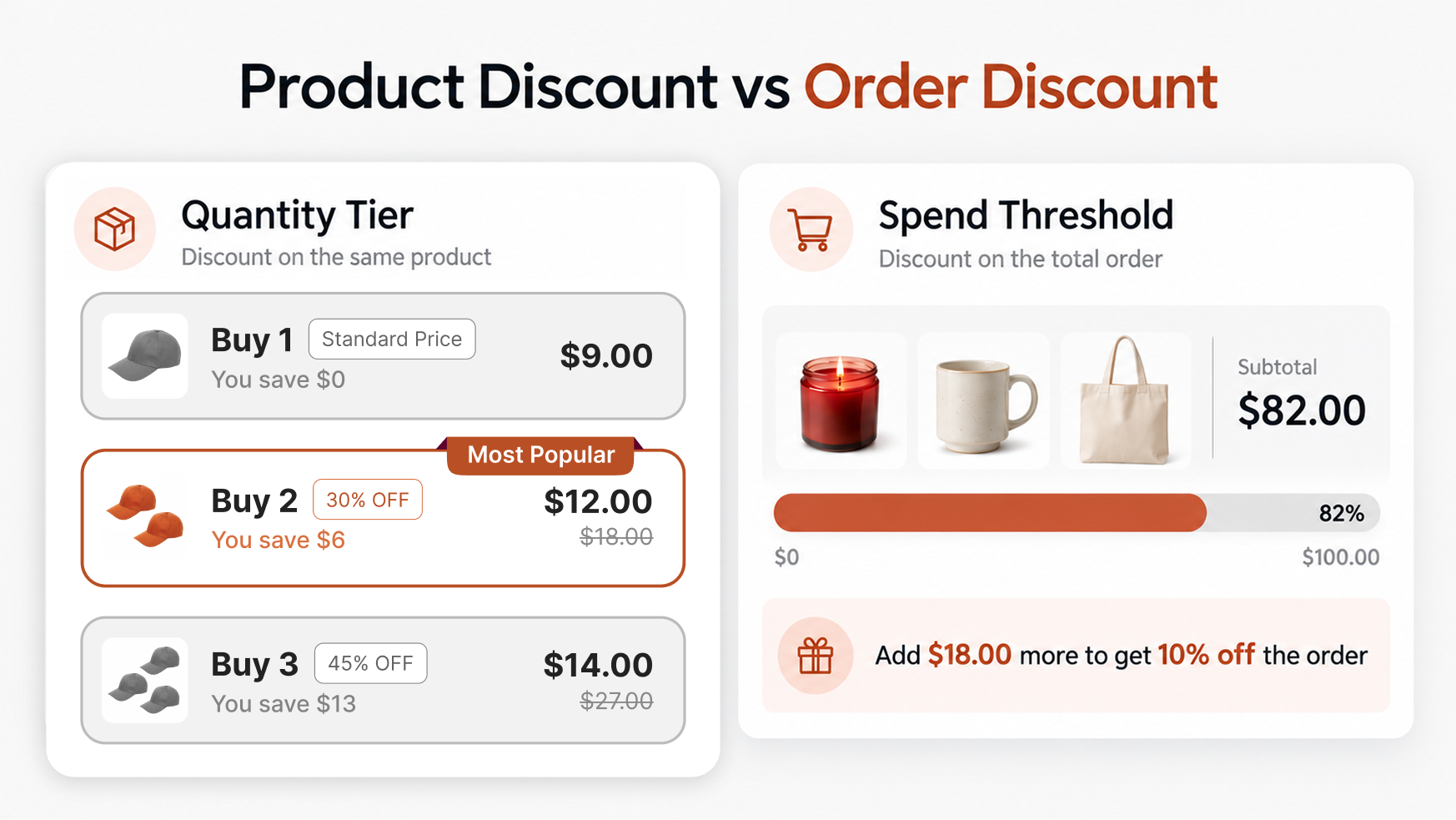
Use a spend threshold when the typical basket mixes products and no single item dominates. Use quantity tiers when one product, or a tight family, drives most orders. Shopify's own Discount types page points stores that need tiered discounts to apps from its App Store or, on Shopify Plus, to Checkout Blocks. Pumper's guide to Shopify automatic discounts shows how to set rules like these to run on their own.
Where it breaks: a threshold set far above your typical basket reads as unreachable, and shoppers ignore it. Watch: the distribution of basket sizes before you set the line, and place it above the median.
4. A Free-Shipping Tier
Shipping cost is the friction that kills carts, and it tends to show up at the last step of checkout, after the shopper has already chosen a quantity and mentally spent the money. Baymard Institute's aggregate of 50 studies puts average cart abandonment at 70.22%. Among shoppers who weren't just browsing, extra costs such as shipping, tax, and fees top the list of reasons for leaving at 40% (Baymard Institute, page updated September 2025).
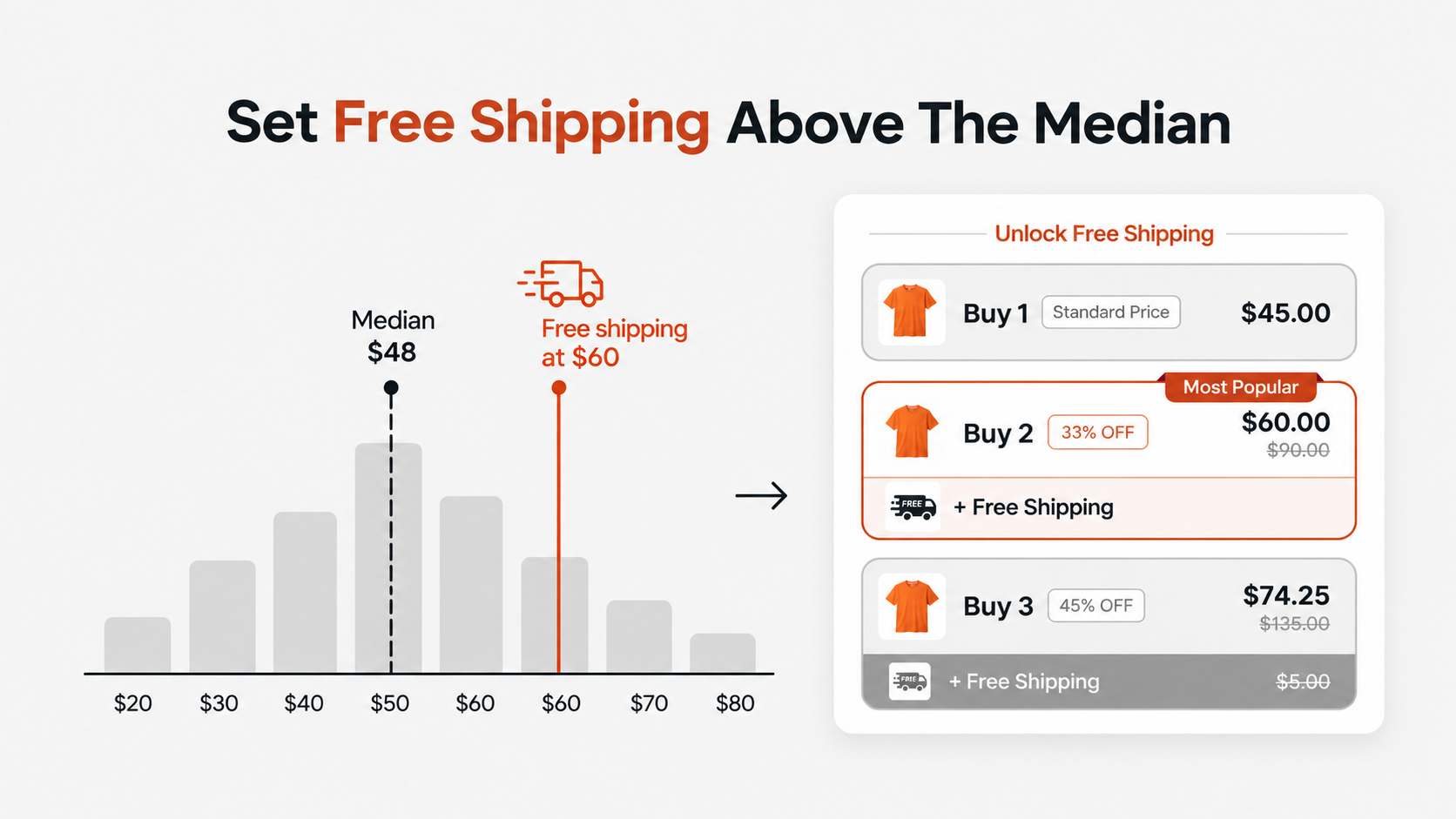
A free-shipping tier answers that objection in the same widget where the shopper chooses the quantity. Pumper lets you attach free shipping to selected tiers, so the larger tier carries the perk and the single unit does not. A no-discount tier, which Pumper also supports, lets you offer free shipping at a quantity with no price cut at all.
Set the threshold from your own order data before you set it from a round number. Pull the median and the 75th percentile of order value over the last quarter, and place the shipping tier above the median, where it asks shoppers to stretch a little instead of a lot. A shipping tier that most shoppers already clear gives away shipping revenue and changes no behavior.
Treat shipping as a real cost as well. A Marketing Science study by Lewis, Singh, and Fay used data from an online retailer that tested many shipping-fee schedules. Free shipping and free shipping above a threshold were highly effective at generating sales. The authors still found the promotions unprofitable for that retailer, because of the shipping revenue given up and because several customer segments didn't respond (Lewis, Singh & Fay, 2006).
That result is one retailer's data, and your margin on shipping may differ. It still argues for pricing the threshold from your actual shipping cost per order and testing it.
Where it breaks: the free tier attracts heavy, low-margin orders you'd rather not subsidize. Watch: profit per order on the shipping tier, after shipping cost.
Five Add-Ons That Give Shoppers a Reason to Climb
5. Progressive Free Gifts
A free gift gives the shopper a reason to climb that a price cut alone may not. Progressive gifts extend the idea into a ladder: a small gift at the second tier, a larger one at the fourth. Pumper supports up to five gifts that unlock one by one as the shopper chooses bigger tiers, and the gift is added to the cart automatically when its tier is unlocked.
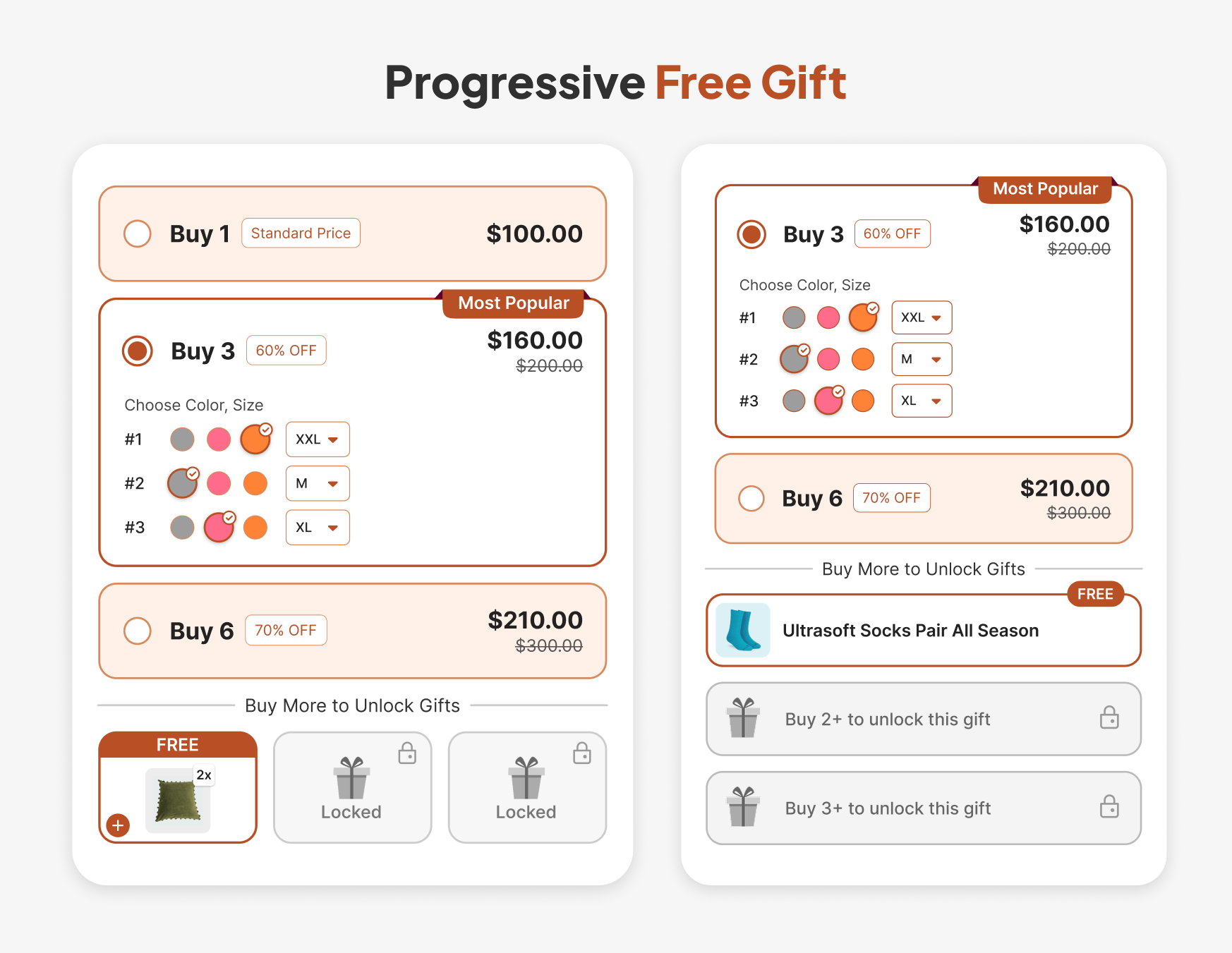
The gift changes the cost structure. A gift costs you its landed cost, not its retail price, so a low-cost, high-perceived-value item can motivate a bigger tier for less than a deeper percentage would. Pick gifts that suit the buyer of the main product. A gift that never gets used builds no goodwill.
You can also display the gift's image, name, and original price in the widget, so the shopper sees the value they're receiving.
Where it breaks: a gift that's out of stock removes the incentive mid-campaign. Watch: gift inventory against tier take rate.
6. Mix-and-Match Quantity Breaks Across a Pool
A single-product ladder asks a shopper to want three of the same thing. A mix-and-match offer lets the shopper pick any combination from a chosen pool, such as any three items from a collection, and counts them toward one tier.
This design fits catalogs with variety: flavors, scents, shades, or accessories. The shopper gets choice, and you get a higher unit count. Pumper's Mix & Match offer type does this, and its guide to mix and match bundles covers pool design, picker layout, and pricing.
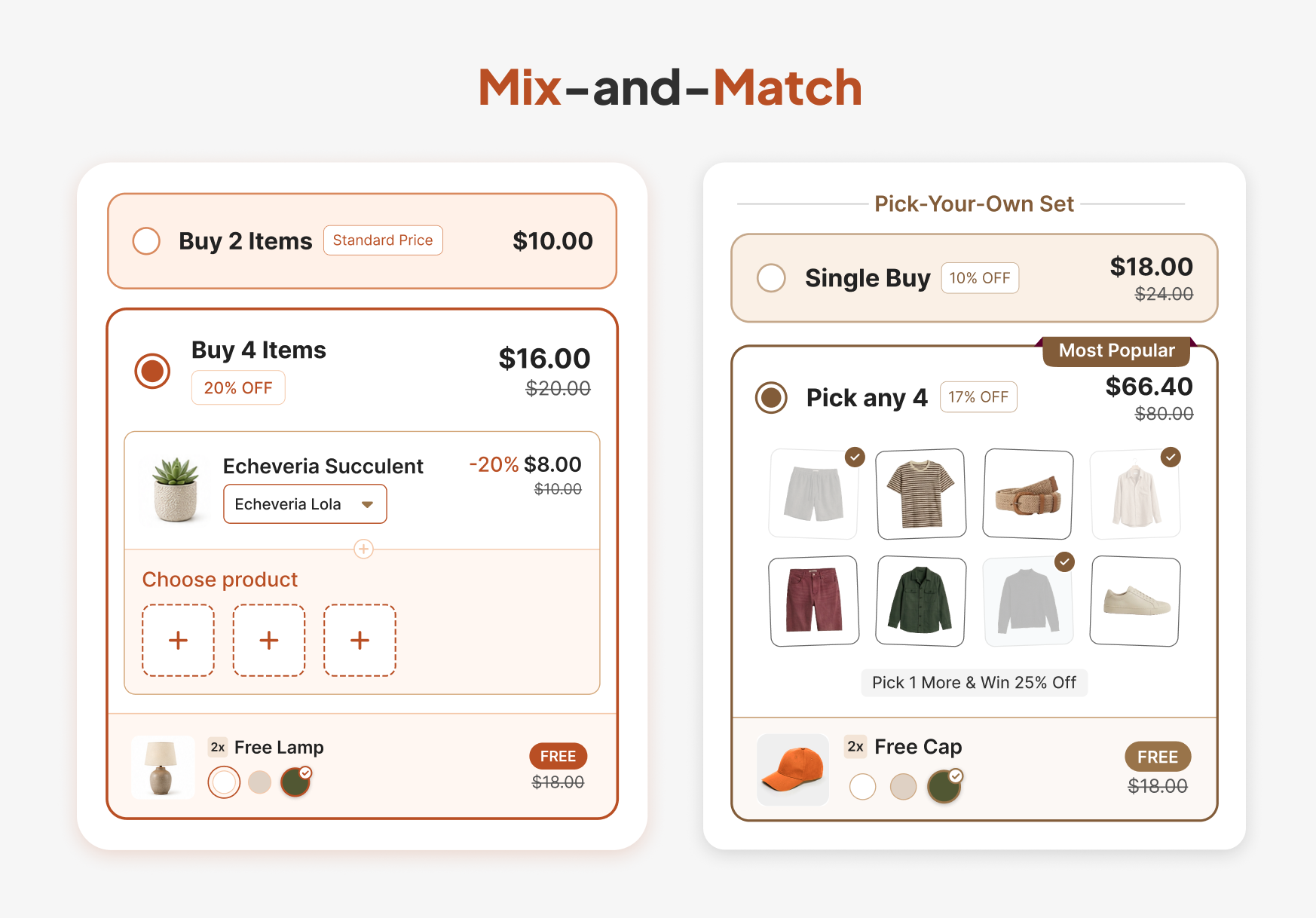
Build the pool carefully. Putting your best seller and your slowest mover in the same pool at one price means every shopper takes the best seller and the discount funds it. Include products with similar margins, or use the pool to move specific inventory you want to clear.
Where it breaks: a pool with too many choices stalls the shopper. Watch: the average number of distinct products per mix-and-match order.
7. Let Shoppers Choose a Different Variant for Each Unit
A quantity tier for a product with sizes or colors raises an immediate question: do all units have to match? If the answer is yes, shoppers who want two sizes leave. Pumper lets customers choose a different variant for each unit, with color or image swatches, and lets you pre-select variants for each tier when you want to guide the choice.
This matters most for apparel, accessories, and anything sold in multiple shades. It also reduces a quiet source of margin loss: when shoppers can't get the combination they want, they buy a single unit or leave.
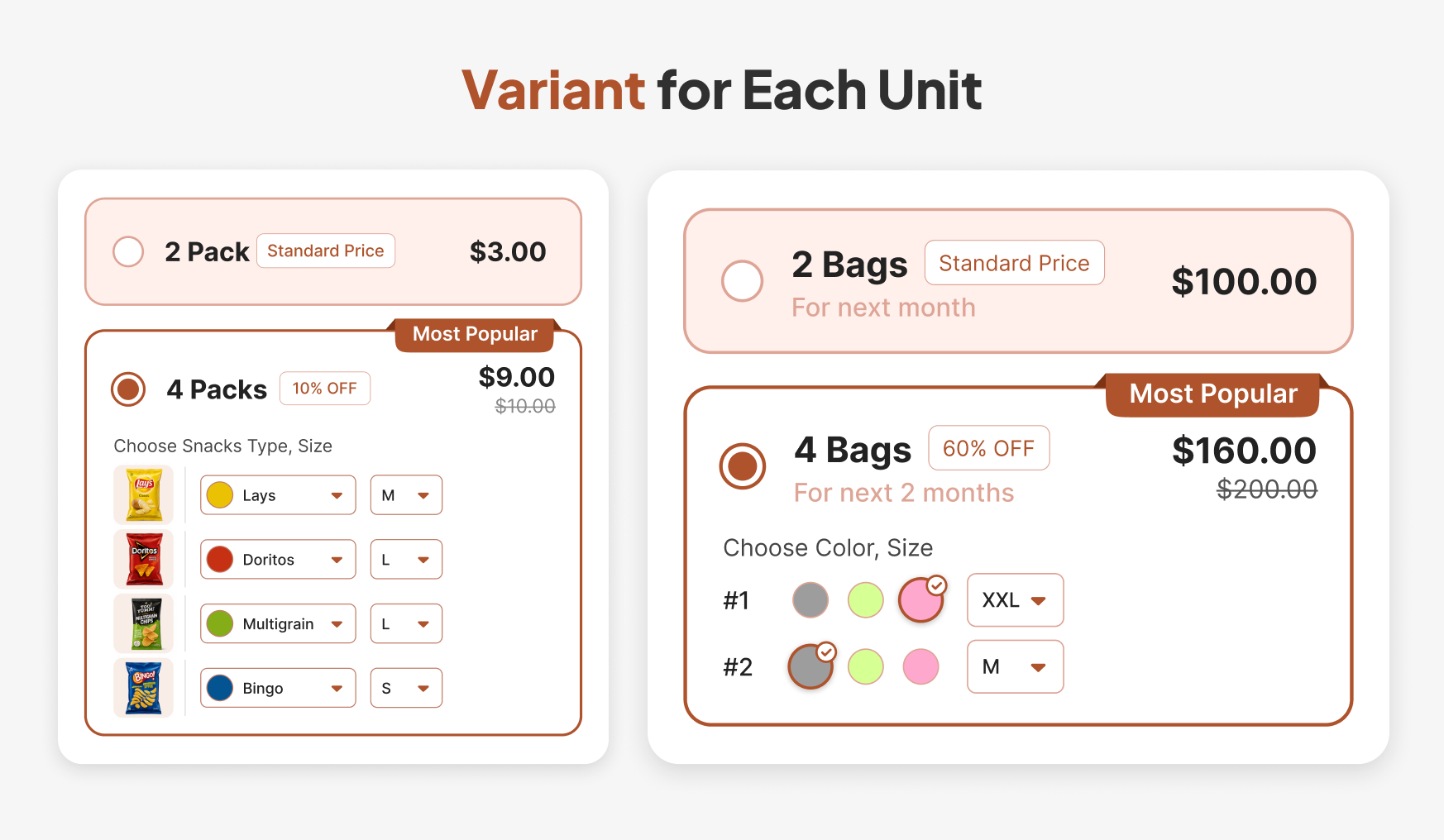
Hide the theme's own variant picker if it conflicts with the widget, since two pickers on one page confuse shoppers. Pumper includes a setting for that. If you want to go further and let shoppers assemble a set from several products, the build-your-own-bundle guide compares formats and layouts.
Where it breaks: an out-of-stock variant inside a selected tier produces a dead end. Pumper can hide out-of-stock variants or show a custom out-of-stock message. Watch: the rate at which shoppers start a tier and abandon at the variant step.
8. Layer a Subscription Over the Ladder
Subscribe & Save adds a one-time purchase versus subscription choice to the same widget. In Pumper’s setup, a single toggle applies a subscription discount across every tier, with three design options and a position above or below the tiers. Subscribe & Save needs a subscription app, such as Appstle or Seal, since the subscription plans come from that app.
The two discounts work on different decisions. The tier discount rewards a bigger first order, and the subscription discount rewards a repeat commitment. Together they give a shopper a clear menu, but they also stack against your margin, so price the combined discount before you launch.
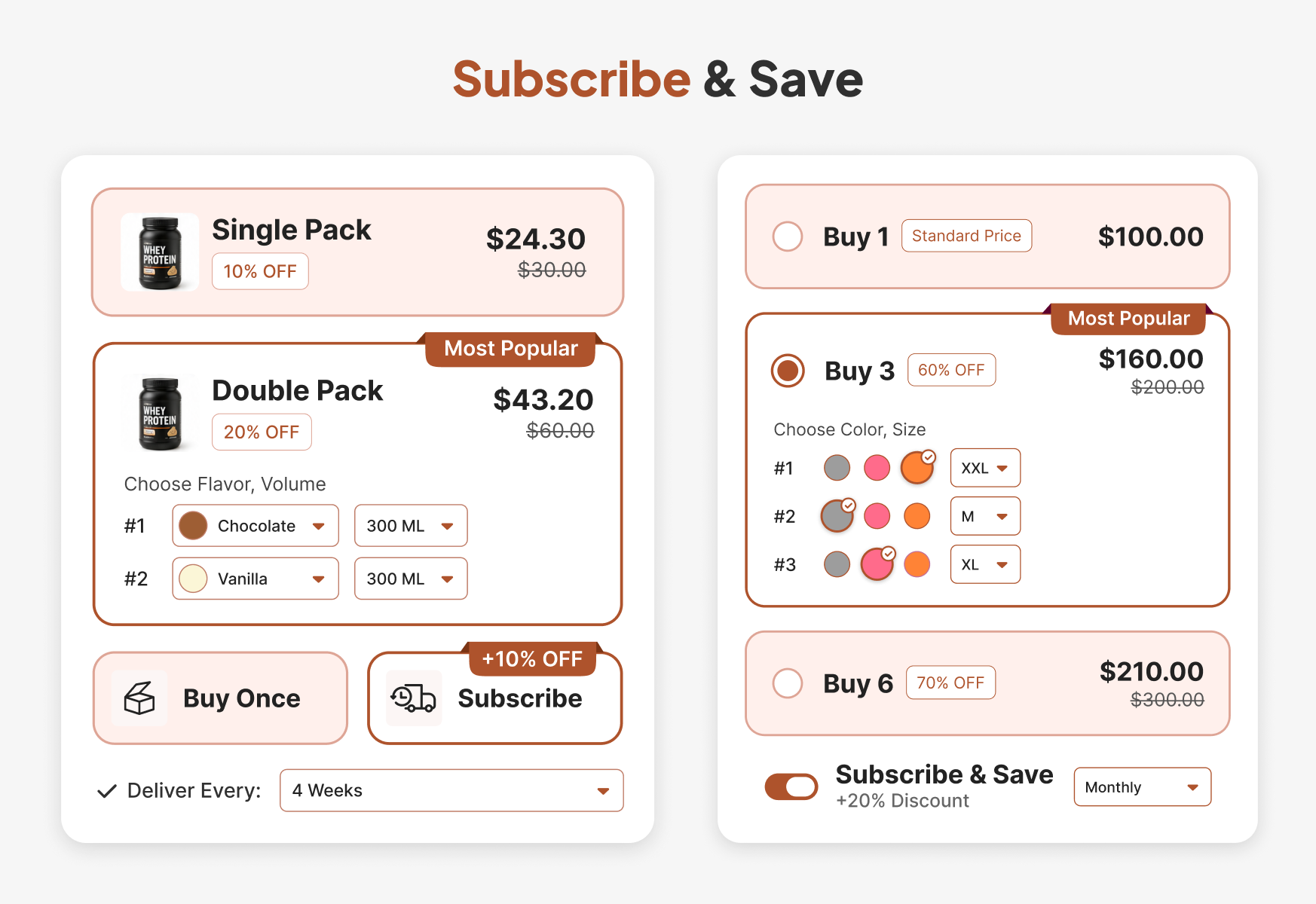
A second option is an inline subscription, a small toggle inside an add-on product row, so a shopper can subscribe to the add-on while buying the main product once. That fits stores where the main product is a one-off purchase, and the add-on is a consumable.
Where it breaks: a deep tier discount plus a subscription discount can push the first order below cost. Watch: the subscription share of orders and the churn after the second shipment.
9. A Checkbox Upsell Below the Tiers
An upsell tied to a tier fits when the add-on belongs with that specific quantity. A checkbox upsell works differently. It shows add-on product cards below all the tiers, and the shopper ticks any of them at a discount, whichever tier they chose.
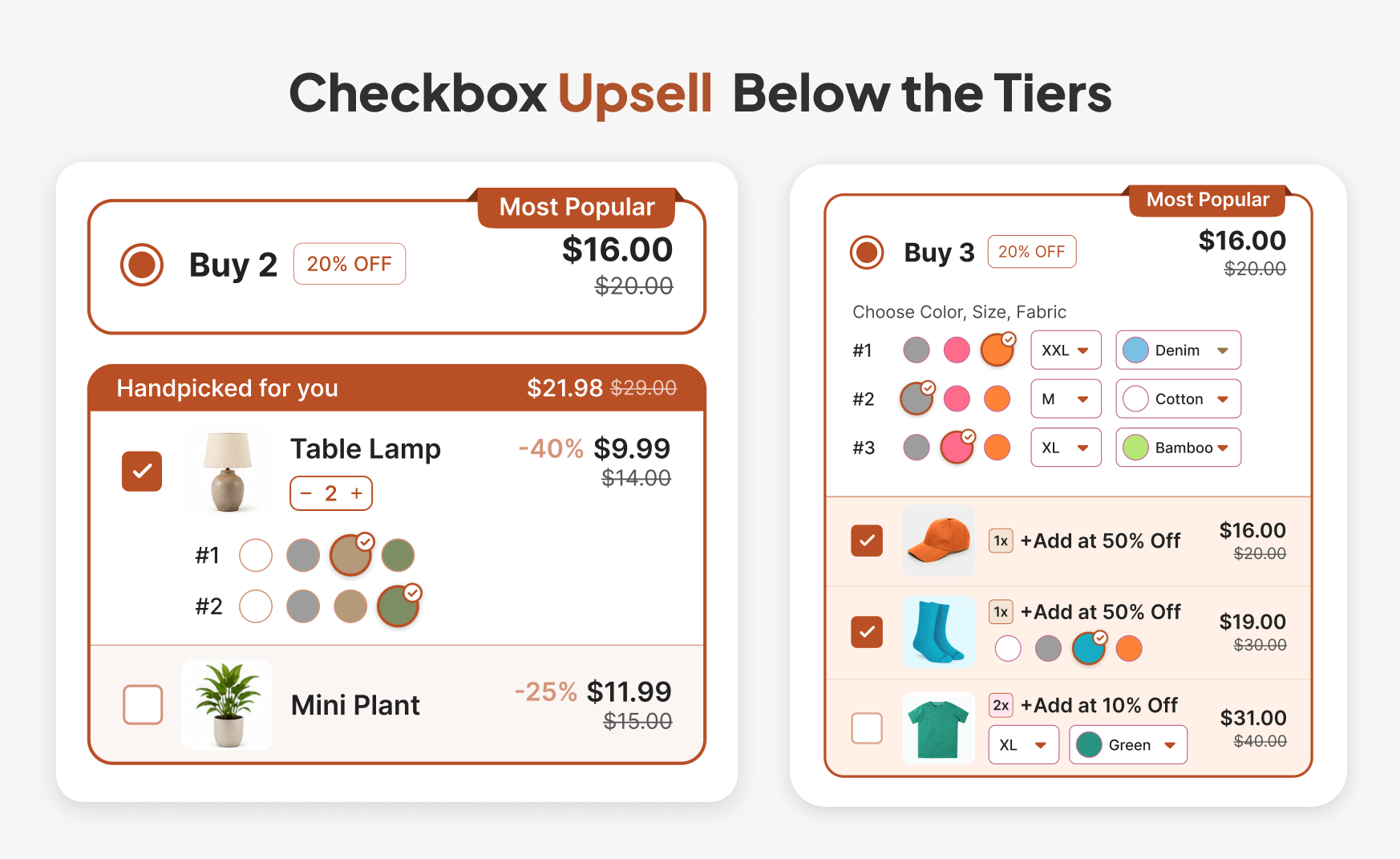
This is the format to use for a product that complements the main item at any quantity, such as an accessory or a refill. Each card carries its own discount, label, and variant picker. Pumper's guide to Frequently Bought Together on Shopify explains how to choose which pairings to show.
Keep the discount on the add-on modest. The shopper already decided to buy the main product, so the add-on needs only enough of a push to turn consideration into a tick.
Where it breaks: too many cards crowd the decision. Watch: add-on attach rate, meaning the share of orders that include at least one add-on.
Three Strategies for Fit and Timing
10. Reward Bulk Buyers Without Giving Away the Top
Some shoppers will buy more than your top tier. Without a rule for that case, a shopper who orders 12 units of a product with a top tier at 4 units might get nothing extra, or might trigger a result you didn't plan.
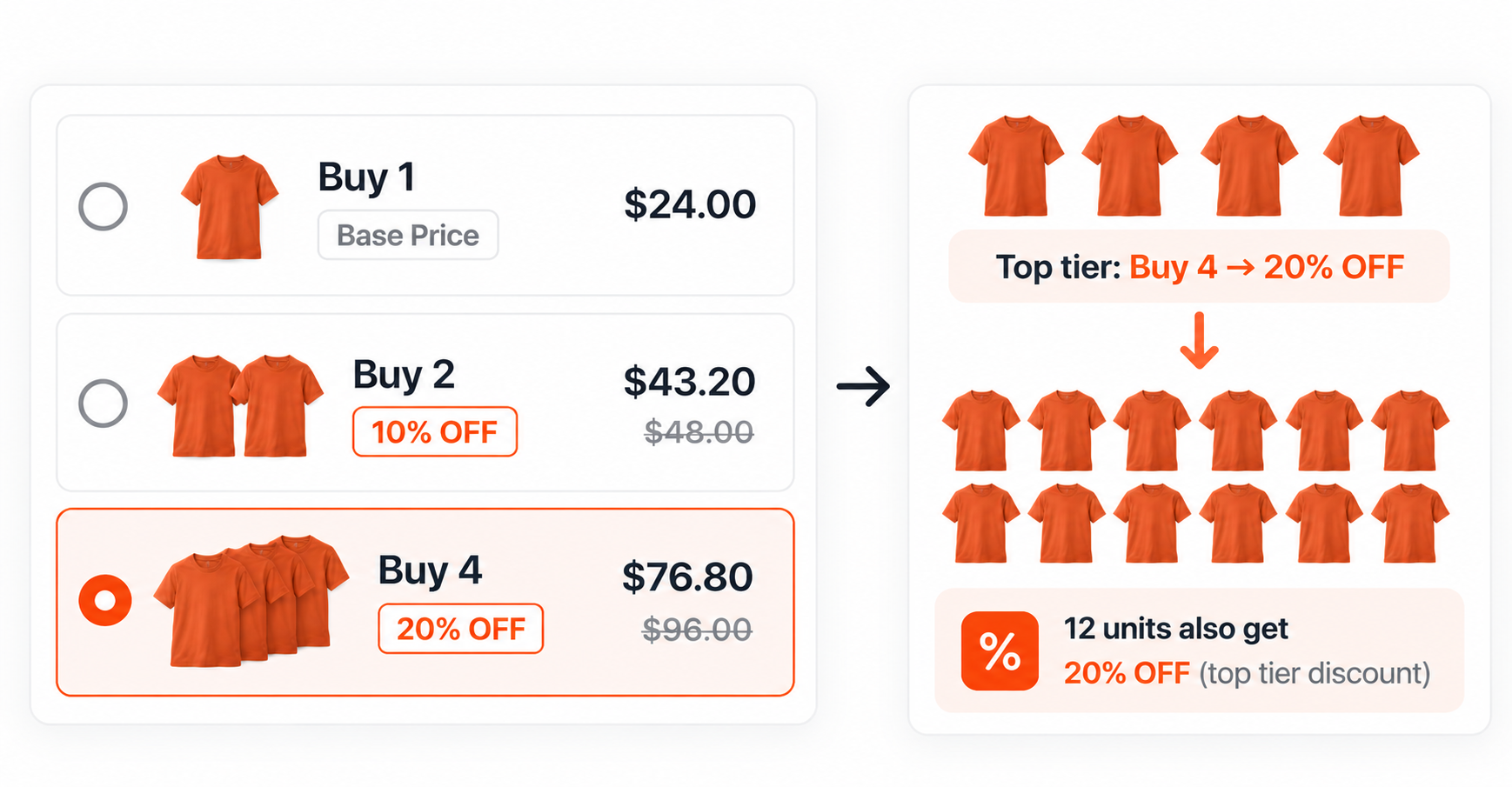
Pumper's volume discount setting applies the biggest tier's discount to every unit in the cart when the quantity exceeds that tier. Set the top tier's discount at a level you can sustain at 12 units, 20 units, or whatever your largest realistic order is, because it will apply across all of them.
If wholesale or business buyers are part of your audience, keep them out of the retail ladder. Pumper can exclude B2B and wholesale customers from an offer, so a retail promotion doesn't undercut a price list built for resellers. For a comparison of tools that handle bulk pricing, the roundup of Shopify volume discount apps lists ten options.
Where it breaks: a generous top tier applied to very large orders can cost more than the sale earns. Watch: margin on orders above the top tier.
11. Match Depth to the Product Type
A single ladder across your catalog treats a candle and a protein powder as the same purchase, and buyers don't treat them alike. Think about how a shopper consumes the product: something used up weekly invites a larger first order, while a treat bought on impulse may not. Klaus Wertenbroch's 1998 Marketing Science research compared matched pairs of "vice" and "virtue" products, such as regular and light versions of the same category. Buyers of the vice versions responded less to quantity discounts because buying in small amounts limits how much of the product they can consume (Wertenbroch, 1998).
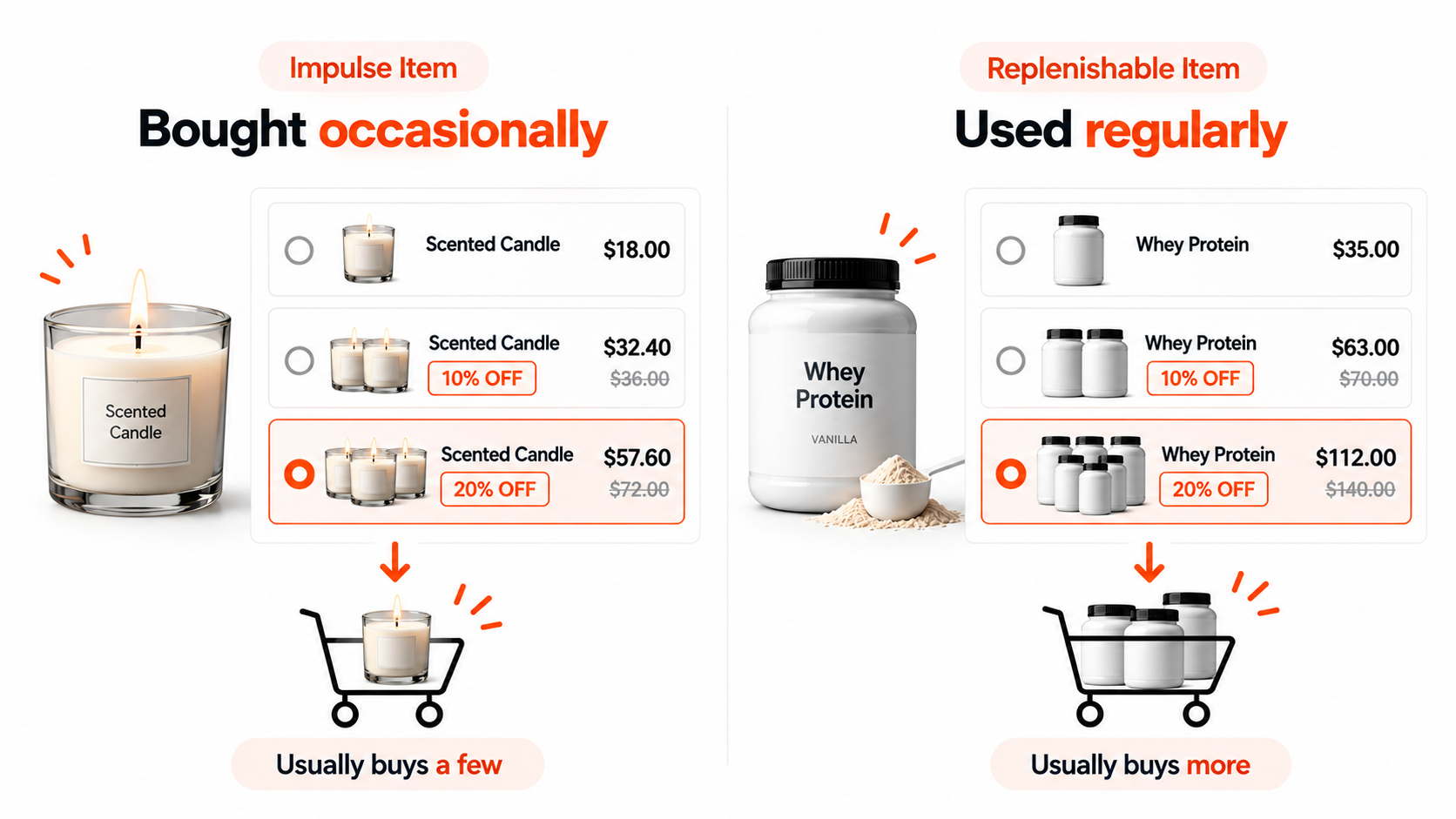
For a Shopify store, "vice" maps loosely onto indulgent, impulse-prone items and "virtue" onto practical or replenishable ones. The research suggests shallow tiers can be enough on practical goods, while indulgent goods may need deeper tiers to move buyers up, or may not respond to quantity breaks at all.
Treat that as a hypothesis to test in your category, since the research used supermarket goods rather than Shopify catalogs. Pumper lets each product or collection have its own tier depth, discount type, and thresholds, so you can run a shallow ladder on one collection and a deeper one on another.
Where it breaks: copying one ladder across the catalog. Watch: tier take rate by collection.
12. A Time-Boxed Deeper Ladder
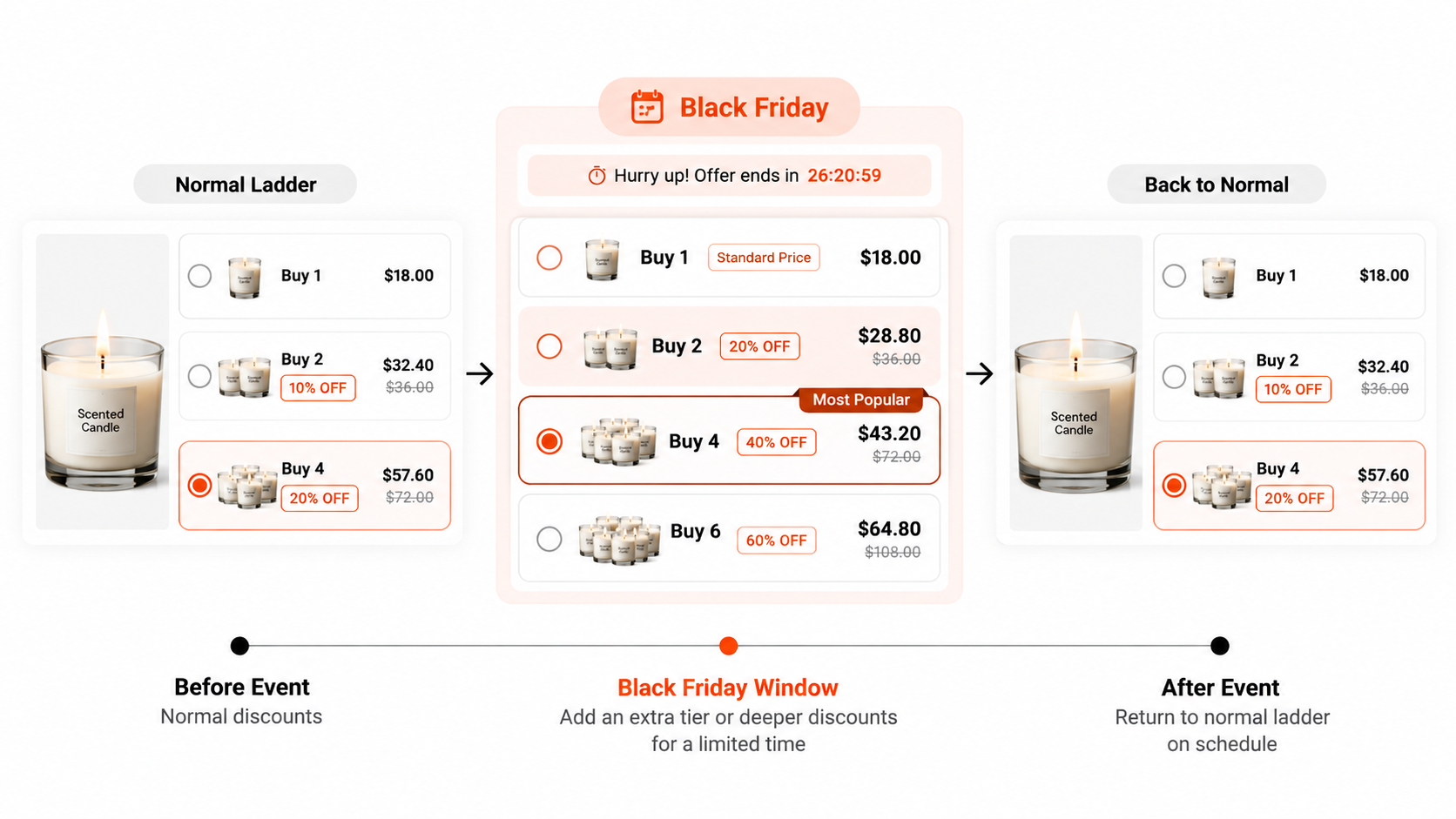
A seasonal event is the natural moment for a deeper ladder, and Pumper's Black Friday promotion ideas list ten formats built for that window. You enable a larger discount or an extra tier, then switch back. Pumper lets you turn any tier on or off without deleting it, which makes the switch-back a toggle instead of a rebuild.
Plan the window before it opens. Write down the extra tier or deeper discount, the start and end dates, and the point at which you'd cut it short, such as a drop in profit per visitor below the normal ladder. Pre-committing keeps a strong first day from talking you into an extension.
The risk is what the deeper ladder teaches. Anderson and Simester's field experiments with a catalog retailer found that deeper current discounts raised later purchases from first-time customers and lowered them from established customers (Anderson & Simester, 2004). A deep seasonal ladder shown to your whole base risks the second effect.
If you run one, announce the end date honestly and return to the normal ladder on schedule. Pumper’s countdown timer in Deadline mode shows the end date and hides when the offer ends.
Where it breaks: extending the deep ladder because sales are good. Watch: reorder rates among existing customers in the weeks after the window closes.
Combining Strategies Without Discounting Yourself Into a Loss
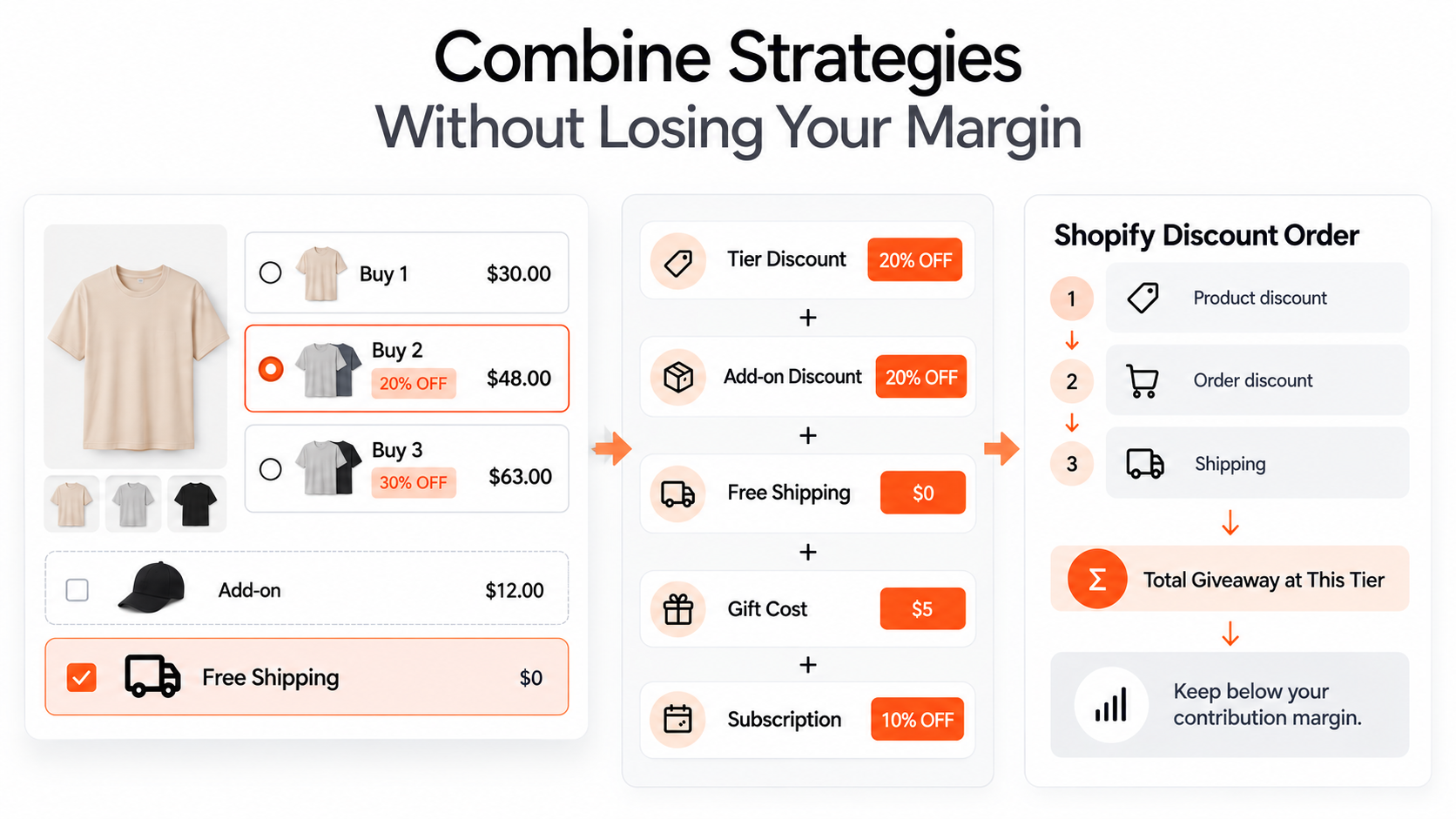
Most stores that run buy more save more end up running more than one strategy at once: a tier ladder with a free-shipping tier and a checkbox upsell, for example. That combination is workable, provided you add up the total giveaway at each tier.
Shopify's rules govern how discounts combine. Product discounts and free-shipping discounts can combine for all merchants, product discounts on different items can combine, and a discount only combines with another when each one's settings allow it. Shopify calculates product discounts first, then order discounts on the revised subtotal, then shipping. A store may have up to 25 active automatic discounts, and when discounts can't combine, the best available one applies (Shopify Help Center).
Pumper adds its own combination controls, with separate switches for stacking alongside Shopify's product, order, and shipping discounts. Decide those switches deliberately, since unintended stacking is a common source of margin loss, and review them whenever you add a new offer to a product that already has one running.
Add the discounts at your most generous tier in a single row before launch: the tier percentage, the subscription discount, any add-on discount, free shipping cost, and gift cost. If that total exceeds your contribution margin on the order, the tier loses money even when it sells well.
Strategy design also borrows from bundling theory. A tier ladder offered next to a full-price single unit is a form of mixed bundling, where the shopper can buy items separately or together. Pumper's comparison of pure versus mixed bundling explains why keeping the full-price option visible usually raises order value faster than forcing the bundle.
How to Tell Which Strategy Is Working
Judge each strategy against one number it should move. The tier ladder should shift the distribution of units per order. The shipping tier should lower abandonment at checkout. The gift ladder should raise the share of orders at the top tier. The checkbox upsell should raise attach rate.
Alongside that, track profit per visitor and average order value together. A strategy can raise order value and still lower profit if the discount outruns the margin on the added units. Pumper's dashboard attributes revenue, conversion, and tier reach to each active offer, which shows which tiers customers reach, and its merchandising guide, the Shopify merchandising playbook, covers how to build a regular review of these numbers.
Change one variable at a time. If you add a shipping tier and a gift in the same week, you'll see a result with no way to attribute it.
Build Your Tier Ladder in MinutesPumper's Quantity Breaks let you create percentage, flat, each-unit, or fixed-price tiers with a pre-selected default and tier tags. Display your offers above the Add to Cart button to encourage shoppers to buy more.
|
Frequently Asked Questions
How many tiers should a buy more save more offer have?
Start with three: a single unit, a middle tier, and a larger tier. Add a fourth only when order data shows shoppers buying beyond your top tier. Each added tier adds clutter and another discount to defend.
Should I discount the first unit?
Leave it at full price in most cases. The single unit anchors the other tiers, and a discount on it removes the contrast that makes the middle tier look attractive.
Can I combine buy more save more with a store-wide sale?
You can, but check how the two combine at checkout, since Shopify applies discounts only where each allows combination, and the stacked result may cut deeper than you intended. Calculate the combined discount at your largest tier first.
Does buy more save more work for a store with one product?
Yes. A single-product store gains from tier ladders, free-shipping tiers, and subscription layers, since every shopper sees the same product page. Mix-and-match and spend thresholds suit larger catalogs.
What if my tiers are not changing order size?
Check visibility before depth. Confirm the widget sits near the Add to Cart button, the savings are shown in dollars where the product is high-priced, and the default tier is the one you want. Raise the discount last.
Choose One Strategy and Prove It
Twelve strategies is a menu, and the right order is one at a time. Pick the strategy that addresses your biggest gap, whether that's single-unit orders, abandoned checkouts, or low attach rates, ship it on one product, and compare the result to the same product before the change.
The offers that last tend to be the ones priced from margin and judged on profit, since both numbers hold up when sales are high and when they aren't.
Run Your First Buy More, Save More Offer on PumperStart with Pumper's free plan, covering up to $300 in extra revenue. Set up quantity discounts, free gifts, free-shipping tiers, and upsells within the same offer to encourage shoppers to buy more.
|