



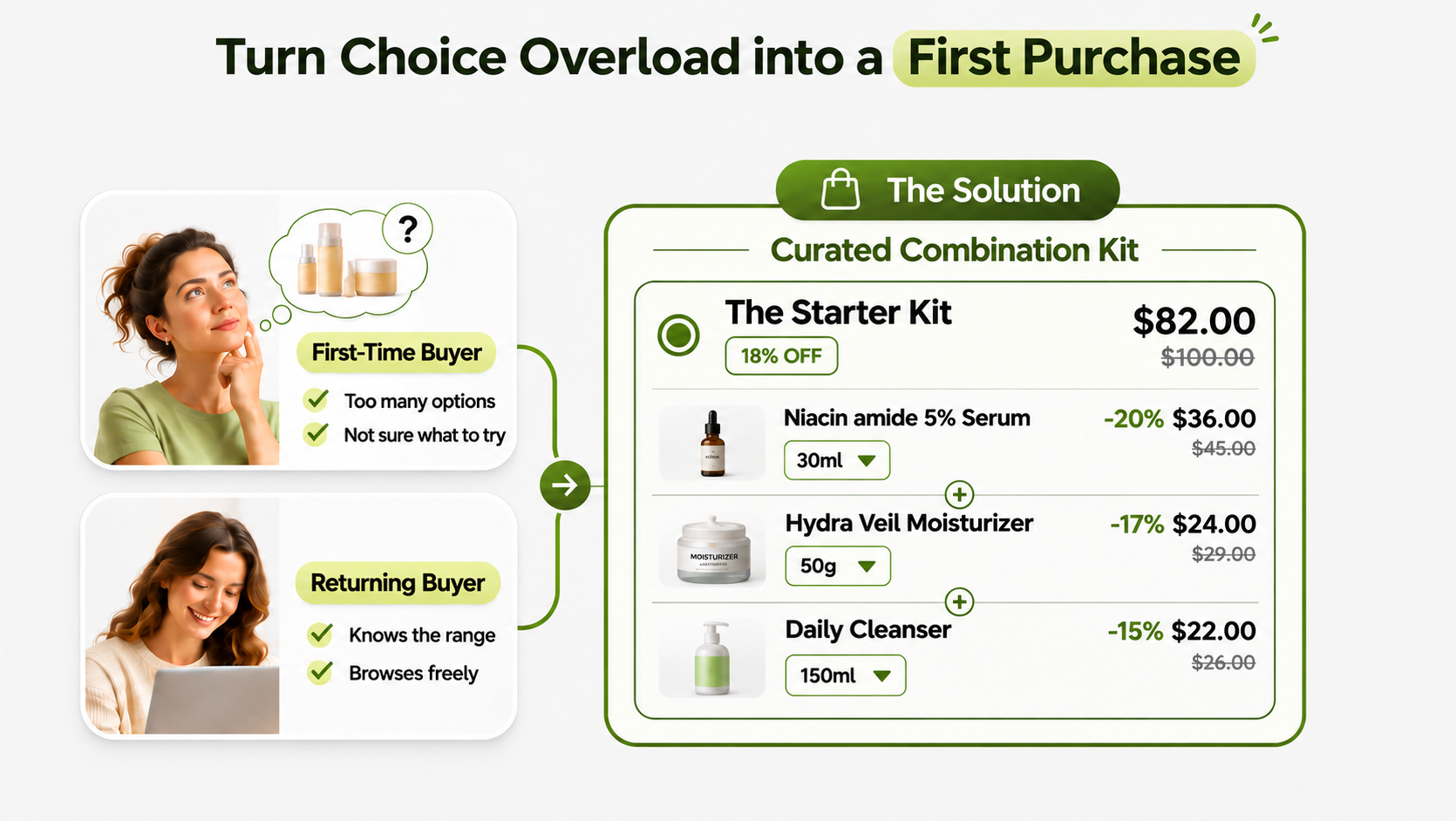
A first-time visitor to a skincare or supplement store faces a specific kind of friction: they want to try the brand, but they don't know whether to start with the serum, the cleanser, or the set of three that keeps showing up in ads. Every extra SKU on that decision is a chance for them to leave and compare somewhere else instead of buying.
A starter kit removes that decision. It's a merchant-curated, fixed set of products sold as one SKU, built to answer the question a new customer is actually asking: "What do I need to get started?" That's a different job than a shopper-built set. Pumper's Mix & Match and build-your-own bundle formats hand the shopper a pool of products and let them assemble their own combination, which works well once someone already knows your catalog. A starter kit does the opposite: you make the decision for them, once, correctly.
This guide covers what makes a starter kit convert instead of looking like a discount dump, how to choose what belongs in one, how to size and name it, how to set it up in Pumper, how to price it, and where to place it so the first-time buyer actually sees it.
Key Takeaways
- A starter kit is a merchant-curated, fixed product set sold as one set at one price, which is a different mechanic from a shopper-built Mix & Match set or a build-your-own bundle.
- The strongest curation rule is one anchor product plus two to three genuinely complementary items, not a random assortment of whatever has inventory.
- Choice-overload research is more conditional than most marketing blogs suggest. A 2010 meta-analysis found the average effect across dozens of studies was close to zero, but it also found the effect is strongest for novices and first-time buyers facing undifferentiated options, which is exactly who a starter kit targets.
- Pumper's Product Bundles offer type is built for a true fixed kit (up to three products); Bundle Themes gets a kit live fast if you don't want to design the widget from scratch.
- Price a kit with a specific (fixed) price and a compare-at price that shows the combined individual cost, so the saving is visible without a tier ladder to parse.
- Place the kit on the page a first-time visitor to that category actually lands on, not buried below your best-selling single SKU.
What a Starter Kit Actually Is (and Isn't)
Three mechanics get lumped together under "bundle," and conflating them is the most common reason a kit underperforms before it even launches.
- Starter kit (fixed, merchant-curated). You pick the exact products, in a fixed combination, and sell the whole thing as one SKU with one price. The shopper's only decision is whether to buy it, not what goes in it.
- Build-your-own bundle (shopper-curated, open pool). The shopper selects their own items from a defined pool until they hit a quantity requirement. This format rewards shoppers who already know what they want and like choosing it themselves.
Mix & Match (shopper-curated, same mechanic as build-your-own under a different name in Pumper's UI). Same logic: the shopper picks, you've pre-approved the pool.
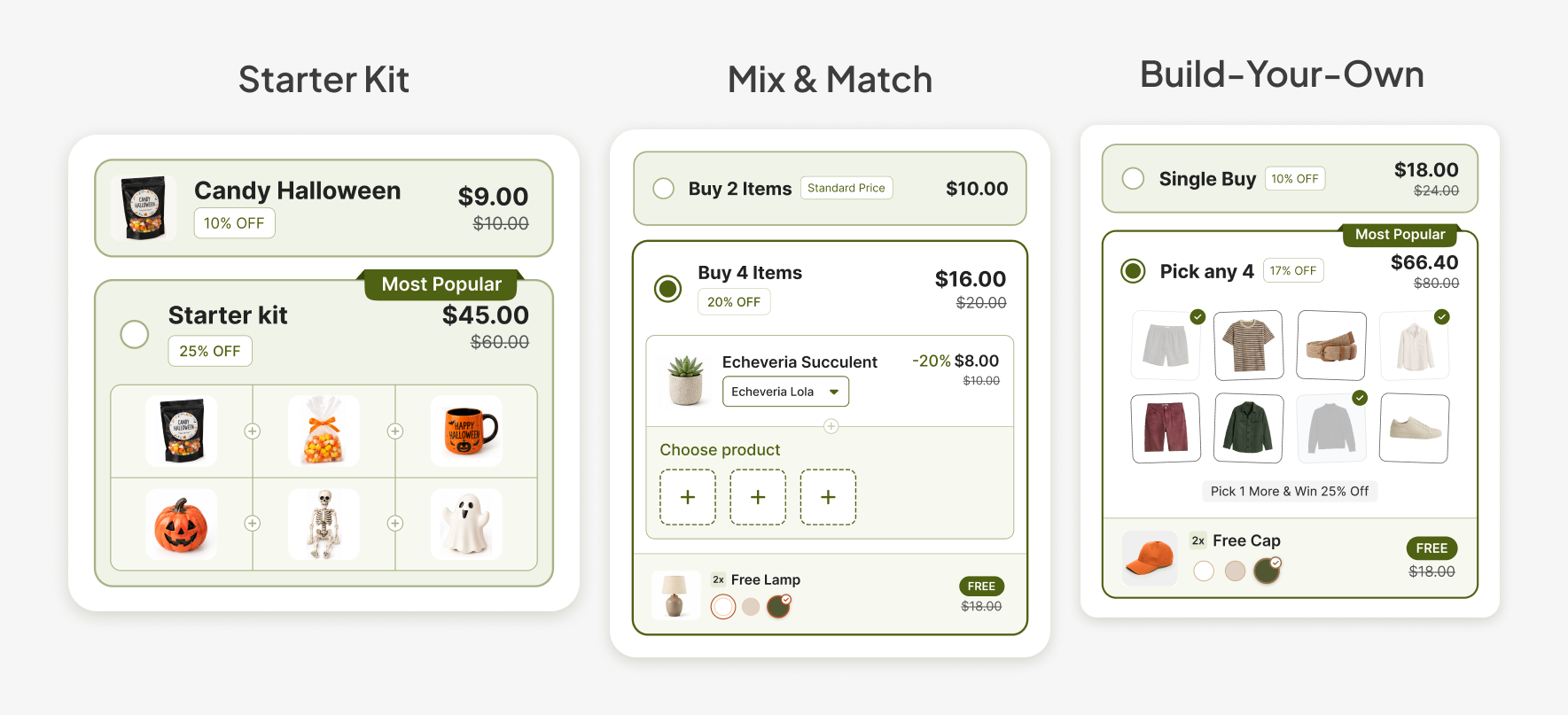
A starter kit is the right call specifically when the buyer doesn't yet know your catalog well enough to build anything themselves, which is almost always true of a first-time visitor. If you want the deeper mechanics of the shopper-curated formats, Pumper's guides to Mix & Match bundles and build-your-own bundles cover those in full. This guide stays narrowly focused on the fixed kit.
See how a fixed bundle differs from a build-your-own setPumper's Product Bundles format sells a fixed set of products at one bundle price, with its own widget, separate from the shopper-curated formats.
|
Why Starter Kits Work for First-Time Buyers
The common justification for curated kits leans on "choice overload": give someone fewer options, and they're more likely to buy. The research behind that claim is more conditional than most marketing content admits, and it's worth knowing the real shape of it before you build a kit around a number you can't defend.
A 2010 meta-analysis by Scheibehenne, Greifeneder, and Todd pooled dozens of choice-overload experiments and found the average effect across all of them was close to zero. Having more options doesn't reliably hurt conversion on its own. But the same analysis found the effect's size and direction depended heavily on context, and it showed up most reliably for people facing complex, undifferentiated choices with no prior experience to lean on, which describes a first-time visitor comparing ten unfamiliar SKUs far better than it describes a returning customer who already knows what they want.
That's the real case for a starter kit. It's not that fewer choices always convert better. It's that a first-time buyer specifically benefits from someone making the first decision for them, which is a narrower and more defensible claim than the blanket "less is more" version repeated across ecommerce blogs.
One of the more concrete figures in this space comes from a trial-size sampling program at the skincare brand U Beauty, built on the Blackcart platform: the program reportedly cut customer acquisition cost by 65%, with 94% of sample buyers new to the brand and 40% going on to buy full size (Blackcart's U Beauty case study, vendor-published). That's a sampling program rather than a multi-product kit, but the underlying mechanism, giving a new customer a low-friction, pre-decided way to try the brand, is the same one a starter kit relies on. Treat the specific percentages as one brand's result, not a universal benchmark.
Recognizable consumer brands have built entire product lines around this idea: a "starter set" or "essentials kit" sold alongside full-size singles is common in skincare, grooming, and supplements precisely because it gives a first-time buyer a default answer instead of a catalog to research.
How to Pick What Goes in a Kit
Start From One Anchor Product
Every good kit has a hero product the customer actually came for, the thing that would sell on its own if the kit didn't exist. Build outward from it instead of starting with "what do we have in stock."
Add Two to Three Genuinely Complementary Items
The supporting items should answer a real question about using the anchor product correctly: what goes before it, what goes after it, what you'd need on day one that a new customer wouldn't think to buy separately. A cleanser and moisturizer alongside a serum answer "how do I actually use this?" A travel case and two extra cartridges alongside a razor don't; they're just inventory with a bow on it.
Resist the Grab-Bag Instinct
A kit assembled to move dead stock reads as a clearance bin, not a considered starting point, and undermines the trust a new customer needs to buy from you at all. If you need to clear slow-moving inventory, that's a real and legitimate goal, but it's a different offer with different framing, not a disguised starter kit.
Keep the Count Tight
A kit with two to four products stays easy to evaluate at a glance. One widely cited vendor guide recommends capping a starter kit at four to six items total; treat that as a reasonable ceiling rather than a rule, since Pumper's own Product Bundles format caps a fixed combo at three products, which in practice forces the discipline this section is arguing for anyway.
Build a fixed starter kit.Combine an anchor product with up to two complementary items into one priced kit, with its own image and savings display above Add to Cart.
|
Kit Sizing and Naming That Actually Converts
A kit's name does real work. "Bundle #2" tells a shopper nothing about what they're getting or why it exists. A name that states the occasion or outcome does the selling before the shopper reads a single product description.
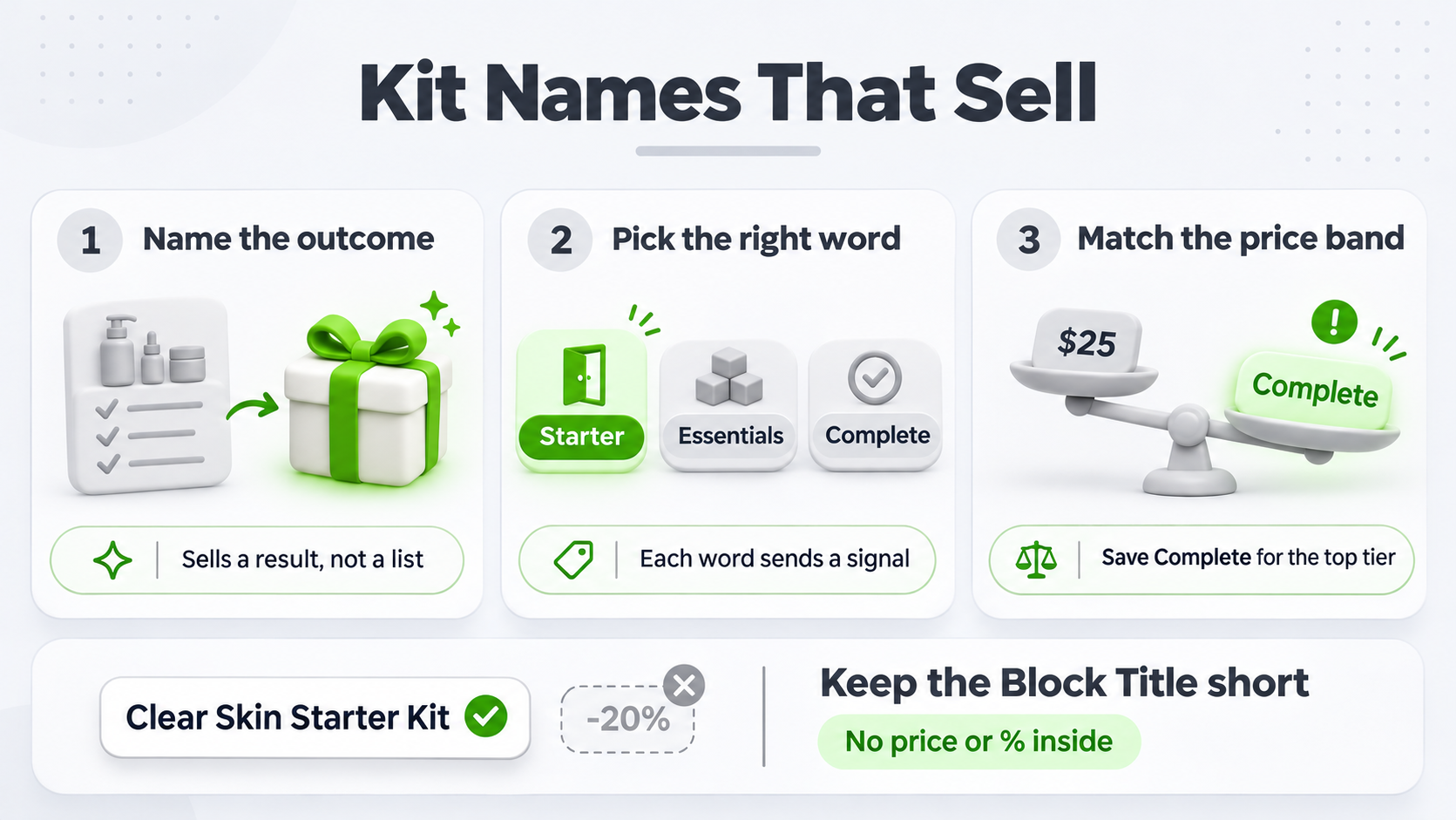
- Name by outcome, not by contents. "The Clear Skin Starter Kit" sells a result. "Cleanser + Serum + Moisturizer Bundle" sells a list.
- Use "Starter," "Essentials," or "Complete" deliberately. "Starter" signals this is the entry point, appropriate for new customers. "Essentials" signals a baseline every customer should own. "Complete" signals nothing is missing, which suits a higher-priced, more comprehensive kit.
- Match the name to the price band. A $25 kit called "The Complete Collection" overpromises and undersells itself at checkout. Save "Complete" language for your highest, most comprehensive tier.
Keep the widget's Block Title short. Pumper's widget title field is plain text with no dynamic variables, so write the kit name to stand on its own without relying on an inserted price or discount percentage.
Setting Up a Starter Kit in Pumper
Two of Pumper's five offer types fit a fixed kit, depending on how much design control you want.
Product Bundles: The True Fixed Kit
This is the direct match for a starter kit. Combine up to three products into one discounted combo with its own price, image, and widget copy. Because the combination is fixed, there's no tier ladder for a new customer to interpret- just one product, one price, one decision.
Bundle Themes: The Fast Launch
If you want a kit live today without designing the widget from scratch, Bundle Themes gives you a ready-made bundle design to populate with your anchor product and its companions. Use this when you want to test a kit concept quickly before investing time in a fully custom widget design.
Either way, the setup flow is the same: pick the offer type, select your anchor product and its companions, choose a discount type, add any free gift or free-shipping unlock, pick a layout and color theme from Pumper's visual theme picker, and publish. The widget renders above the Add to Cart button via native Shopify Theme App Extensions, so it appears automatically once the app block is active in your theme editor, with no custom code.
Launch a starter kit without writing codePick an offer type, select your products, and publish a kit widget above Add to Cart through Shopify's native Theme App Extensions.
|
Pricing a Starter Kit
A starter kit's price has to do two things at once: feel like a clear saving, and still protect your margin on a customer you haven't proven will come back.
- Specific price (fixed price) is the natural default for a kit. One flat number, "The Starter Kit, $42," removes any mental math and locks your margin regardless of which variant a customer selects within the kit.
- Percentage discount works better when your catalog's unit costs vary enough that a single fixed price would underprice some product combinations and overprice others.
- Compare-at or custom compare price shows the combined individual price next to the kit price, so the saving is visible without the shopper doing the subtraction themselves. This matters more for a kit than for a quantity break, since there's no tier ladder doing that visual work for you.
Price rounding to .99 or .95 endings keeps the kit consistent with the rest of your pricing without manual adjustment.
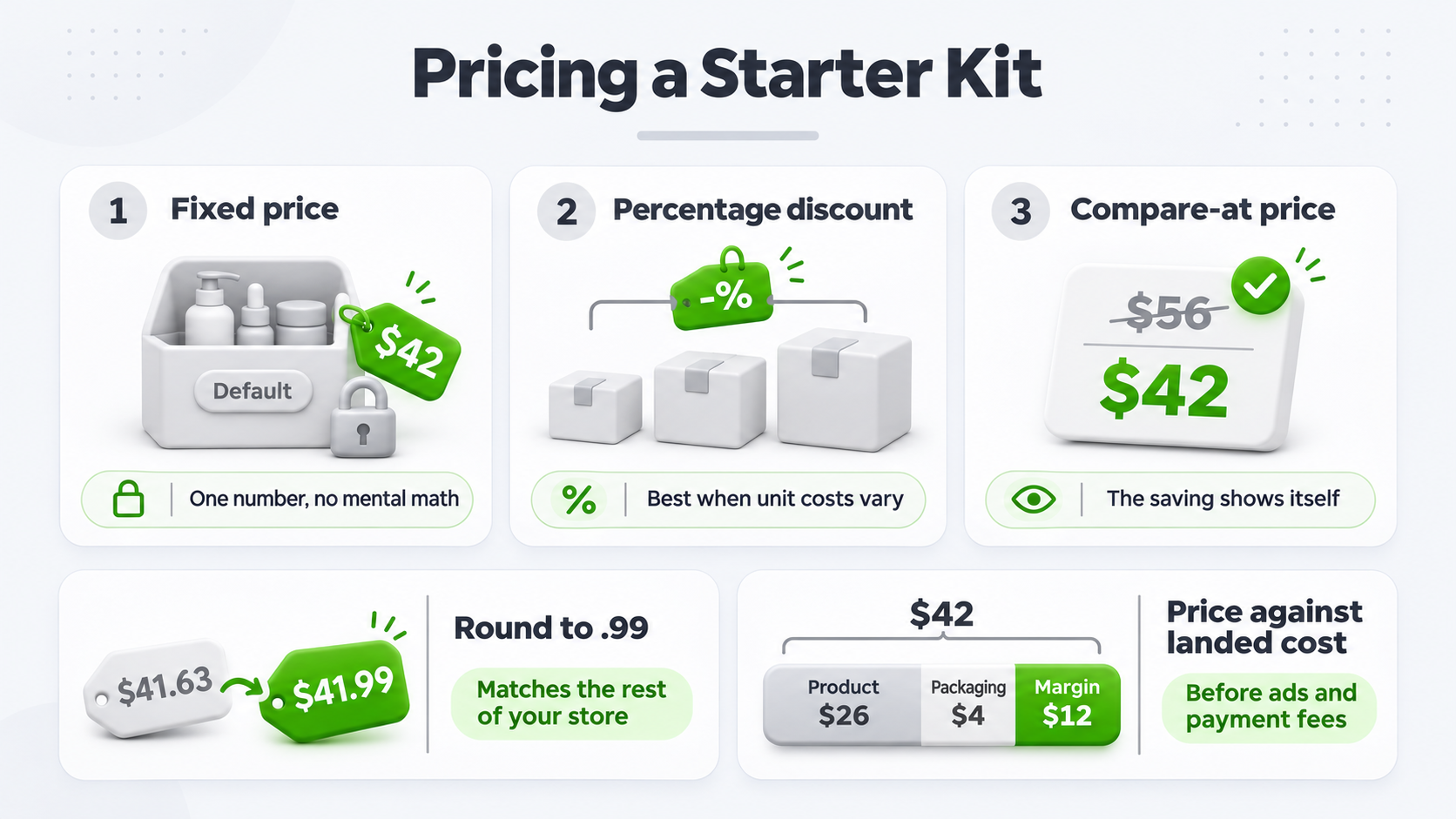
Price against your actual landed cost for the full kit, not a round number that looks clean next to your single-item prices. A $42 kit built from $26 in product cost and $4 in packaging clears $12 before ad spend and payment fees, a number worth checking before you decide the kit is "basically free to offer." Pumper's guide to increasing average order value on Shopify covers that margin math in more depth if you're pricing more than one kit at once.
Where to Place Starter Kits for New Customers
A starter kit does the most work when it's the first offer a new visitor to a category actually sees, not something they'd have to already know to search for.
- Category landing pages. If a shopper arrives from a "best skincare starter kit" search or an ad targeting first-time buyers, the kit should be the first thing on the page, not three scrolls down past your best-selling single SKU.
- The anchor product's own page. Place the kit widget above Add to Cart on the anchor product itself, so a shopper who was about to buy the single item sees the more complete option before they commit.
Homepage, for stores where the kit is the primary offer. If your brand is built around a signature starter kit rather than a wide catalog, give it homepage placement rather than treating it as one SKU among many.
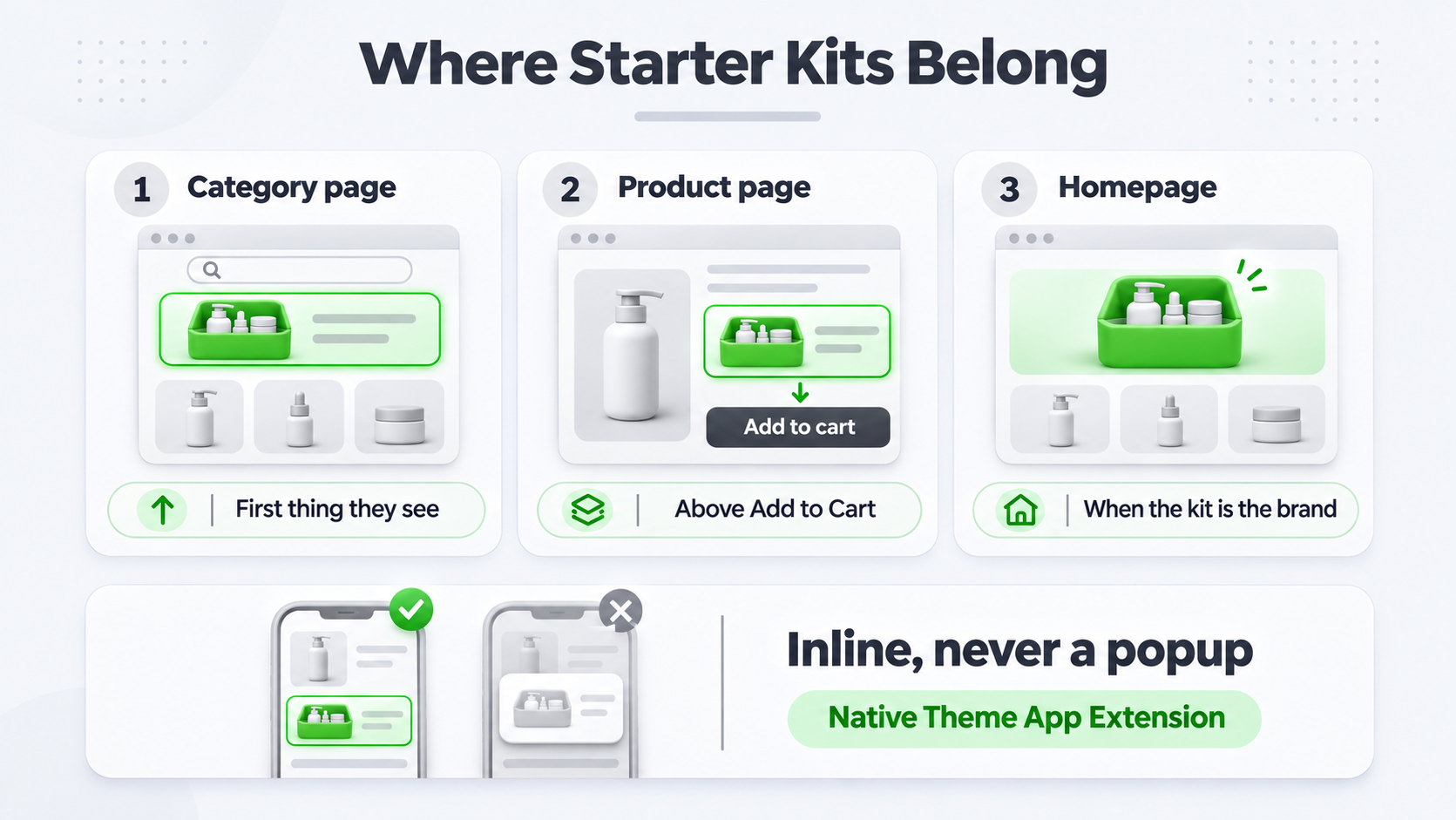
Because Pumper's widgets render through native Theme App Extensions rather than a popup or cart-drawer surface, the kit shows up inline, at the moment a shopper is already evaluating the anchor product, instead of interrupting them.
A Worked Example: Building a $42 Skincare Starter Kit`
This is an illustrative walkthrough, not a documented case study, to show how the pieces above combine in Pumper's dashboard.
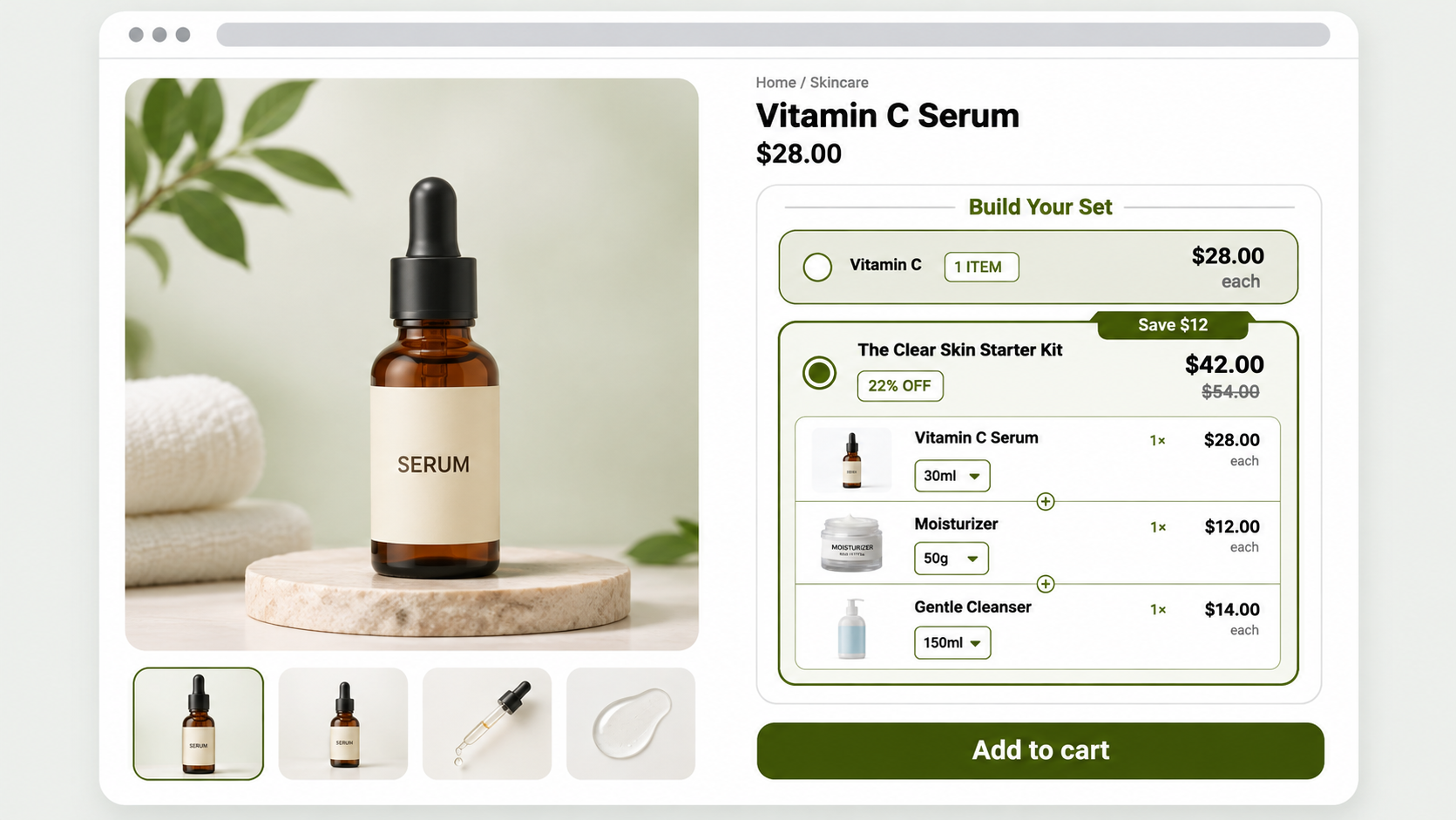
Say your anchor product is a $28 vitamin C serum, and you want a true starter kit for first-time visitors to your skincare category.
- Pick the anchor and companions. The serum, plus a $14 gentle cleanser and a $12 moisturizer, are the two products a first-time buyer would need to use the serum correctly.
- Choose the offer type. Product Bundles, since you're combining three fixed products into one kit at one price.
- Set the discount type. Specific price at $42, against a combined individual price of $54, a clear and simple saving.
- Add the compare-at price. Show $54 struck through next to the $42 kit price, so the saving reads instantly.
- Name it. "The Clear Skin Starter Kit," not "Serum + Cleanser + Moisturizer Bundle."
- Design and place the widget. A Vertical layout with one combined product image, placed above Add to Cart on the serum's product page and featured on your skincare category landing page.
- Check the math. If the three products cost you $19 combined and packaging runs $3, you're clearing roughly $20 before ad spend and payment fees, a number worth confirming against your own catalog before you publish.
Common Mistakes With Starter Kits
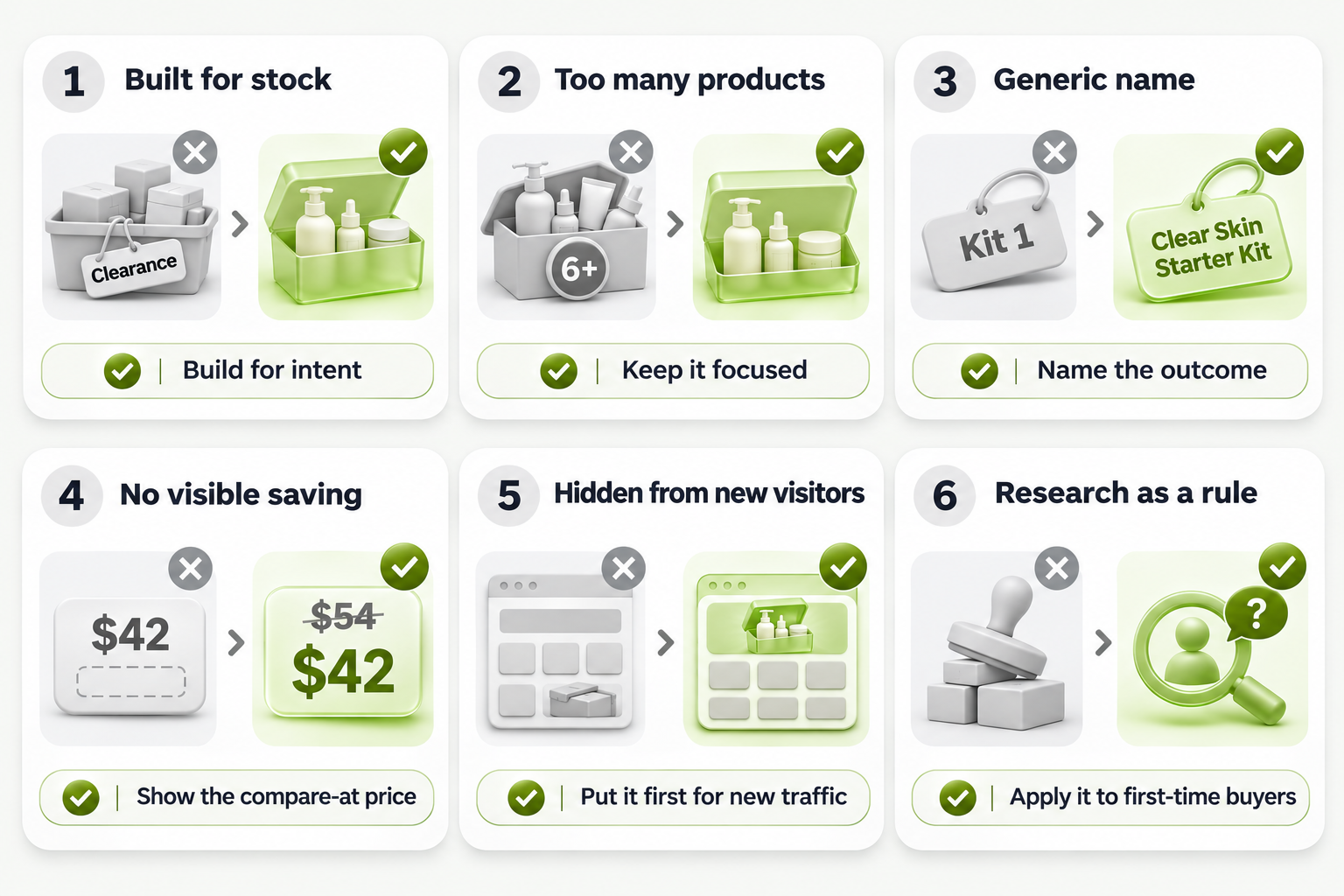
- Building the kit around inventory instead of intent. A kit assembled to clear stock, rather than to answer "what does a new customer need," reads as a clearance bin and costs you trust with the exact customer you're trying to win.
- Too many products for a first decision. A kit with six or more items reintroduces the comparison problem the kit was supposed to solve.
- A generic name. "Starter Bundle" or "Kit 1" wastes the one piece of copy that could have told the shopper why this exists.
- No visible saving. Without a compare-at price, a shopper has no quick way to tell the kit is actually a better deal than buying the anchor product alone.
- Hiding the kit from new customers. A kit that only existing customers happen to stumble across in a collection page isn't doing its job. It needs to be in front of the exact traffic it was built for.
- Treating the choice-overload research as settled. The effect is real for first-time buyers facing unfamiliar options, but it isn't a blanket law that fewer SKUs always sell better. Don't justify an under-curated kit by citing a number from a different context.
Final Verdict
A starter kit isn't a discount mechanic wearing a friendlier name. It's a decision you make on behalf of a customer who doesn't yet know your catalog well enough to make it themselves, built from one anchor product and the two or three items that genuinely complete it, priced with a visible saving, and placed exactly where that first-time customer actually lands. Pumper's Product Bundles and Bundle Themes formats both get a fixed kit live without a developer, with the pricing controls and placement options to back it.
Get your starter kit live this weekCombine your anchor product with its companions into one priced kit, published above Add to Cart with no theme code. Start on the free plan.
|
FAQs
What's the difference between a starter kit and a bundle?
Every starter kit is a bundle, but not every bundle is a starter kit. "Bundle" is the general category: any set of products sold together. A starter kit is a specific kind of bundle, fixed, merchant-curated, and built around a new customer's onboarding question rather than a shopper's own preference.
How many products should a starter kit have?
Two to four tends to work best. Pumper's Product Bundles format caps a fixed combo at three products, which lines up with the curation discipline a good kit needs anyway: one anchor plus a couple of genuine companions, not an assortment.
Should a starter kit always be cheaper than buying the items separately?
It should always look that way at a glance, which is what a compare-at price does. Whether it's actually cheaper is a pricing decision you control; a specific/fixed price lets you set the exact number regardless of how the combined individual prices land.
Can I build more than one starter kit for the same product line?
Yes, and it's often worth it. A smaller "Starter Kit" at a lower price point and a larger "Complete Kit" or "Essentials Set" at a higher one let you serve both a cautious first-time buyer and one who's ready to commit further, as long as the naming and price bands stay distinct from each other.
Do starter kits work for B2B or wholesale Shopify stores?
The same logic applies, with a different anchor: a new wholesale account facing an unfamiliar catalog benefits from a defined starting assortment just as much as a retail first-time buyer does. Pumper's targeting options let you scope a kit to specific markets or exclude B2B accounts if you need the kit to behave differently for that segment.