



Shopify ships a free bundling tool with every store. Before you install anything else, it's worth knowing exactly what that free tool does, because for some merchants it's genuinely enough, and installing a second app on top of it is wasted setup time.
Shopify's own Help Center describes Shopify Bundles as a first-party app for creating fixed bundles and multipacks, available on every plan. That covers a real, common need. It doesn't cover quantity-break pricing, build-your-own sets, gift-with-purchase ladders, or the urgency and analytics features that come standard in most third-party bundle apps.
This guide walks through what the native app actually supports, where merchants consistently report it stops, what a third-party app adds on top (using Pumper's own feature set as one concrete example of what the category looks like), and a decision framework for which one fits your store.
Key Takeaways
- Shopify Bundles is free on every plan and handles fixed bundles and multipacks with real-time inventory tied to each component's stock level (Shopify Help Center, 2026).
- The native app doesn't support quantity-break/tiered pricing, mix-and-match builders, or Buy X Get Y offers; merchants who need those mechanics add a dedicated app rather than replacing the native one outright.
- Merchant and community reports describe additional limits worth checking against your own setup: a cap on bundled products and variant options, inventory counted across all locations with no per-location control, and incompatibility with some stores with older checkout customizations reporting conflicts on some Plus stores.
- Third-party bundle apps vary widely in scope. Pumper Bundles is one example that adds four more offer types beyond fixed bundles, plus urgency widgets and per-offer analytics, priced by extra revenue generated rather than a flat fee.
- The right choice depends on catalog complexity and the specific mechanic you need, not on which app has the better marketing page. Match the tool to the job first.
What Shopify's Native Bundles App Actually Does
Fixed Bundles and Multipacks
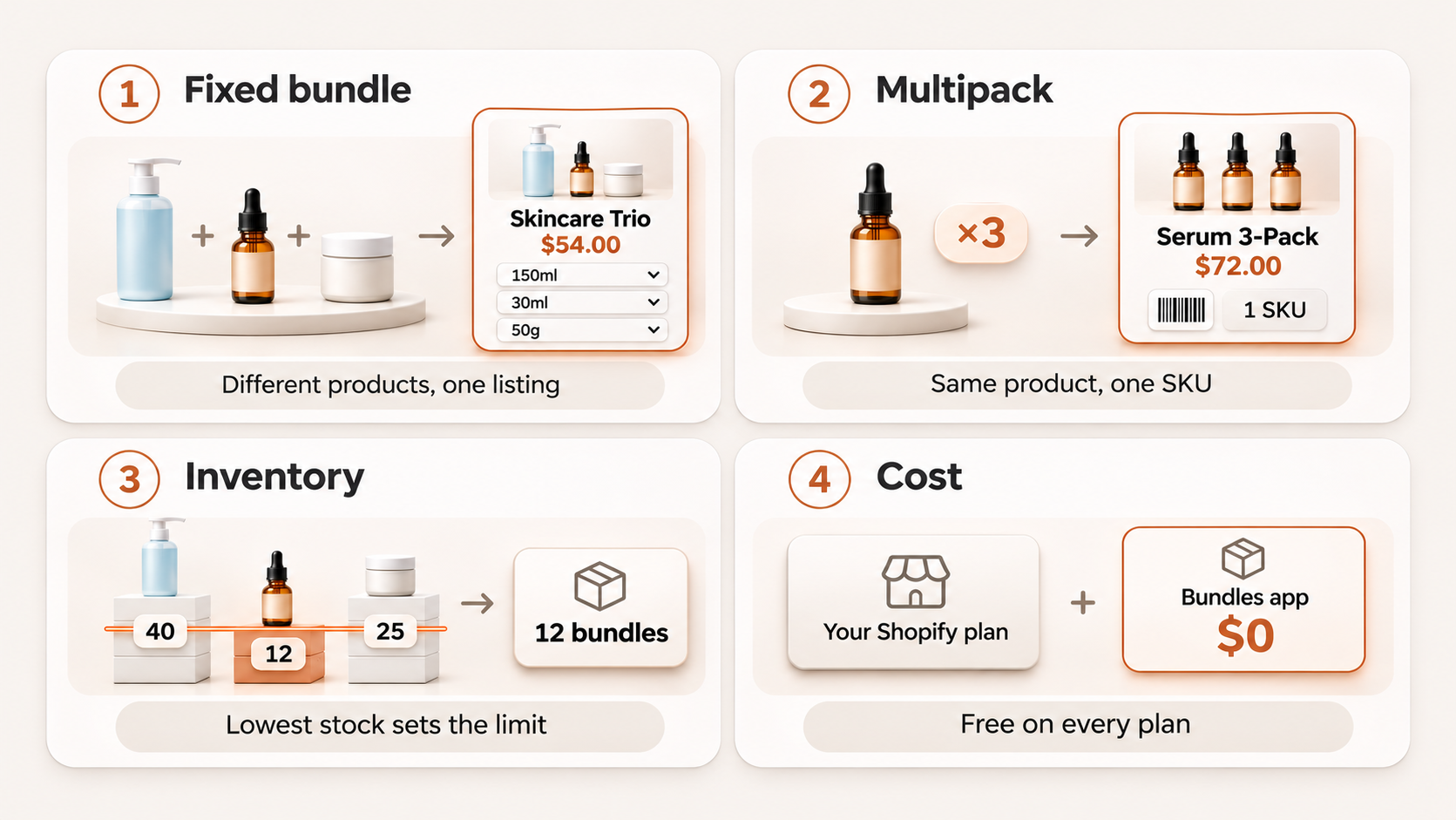
The app supports two formats. A fixed bundle combines a predetermined set of different products into one listing, where the shopper can still pick variants for each component. A multipack is the same idea applied to one product, created by duplicating that product within the bundle so the listing sells, say, three of the same item as one SKU (Shopify Help Center, 2026). Both formats are edited either inside the Shopify Bundles app or directly from the Products page in your admin.
How Inventory Works
Bundle inventory is calculated from the stock levels of the components inside it, and the product with the lowest available inventory sets the ceiling on how many bundles can sell. Shopify's documentation describes this as updating in real time. Some merchant reviews describe a related friction: the app checks inventory across all locations combined, with no way to restrict a bundle to stock at one specific location, which matters more for multi-warehouse operations than for a single-location store.
Cost and Availability
Shopify Bundles costs nothing beyond your existing Shopify plan and is available regardless of which plan tier you're on. That's a meaningful starting point: if your only need is "sell these three products together as one SKU," you may not need to evaluate anything else.
Where the Native App Hits a Wall
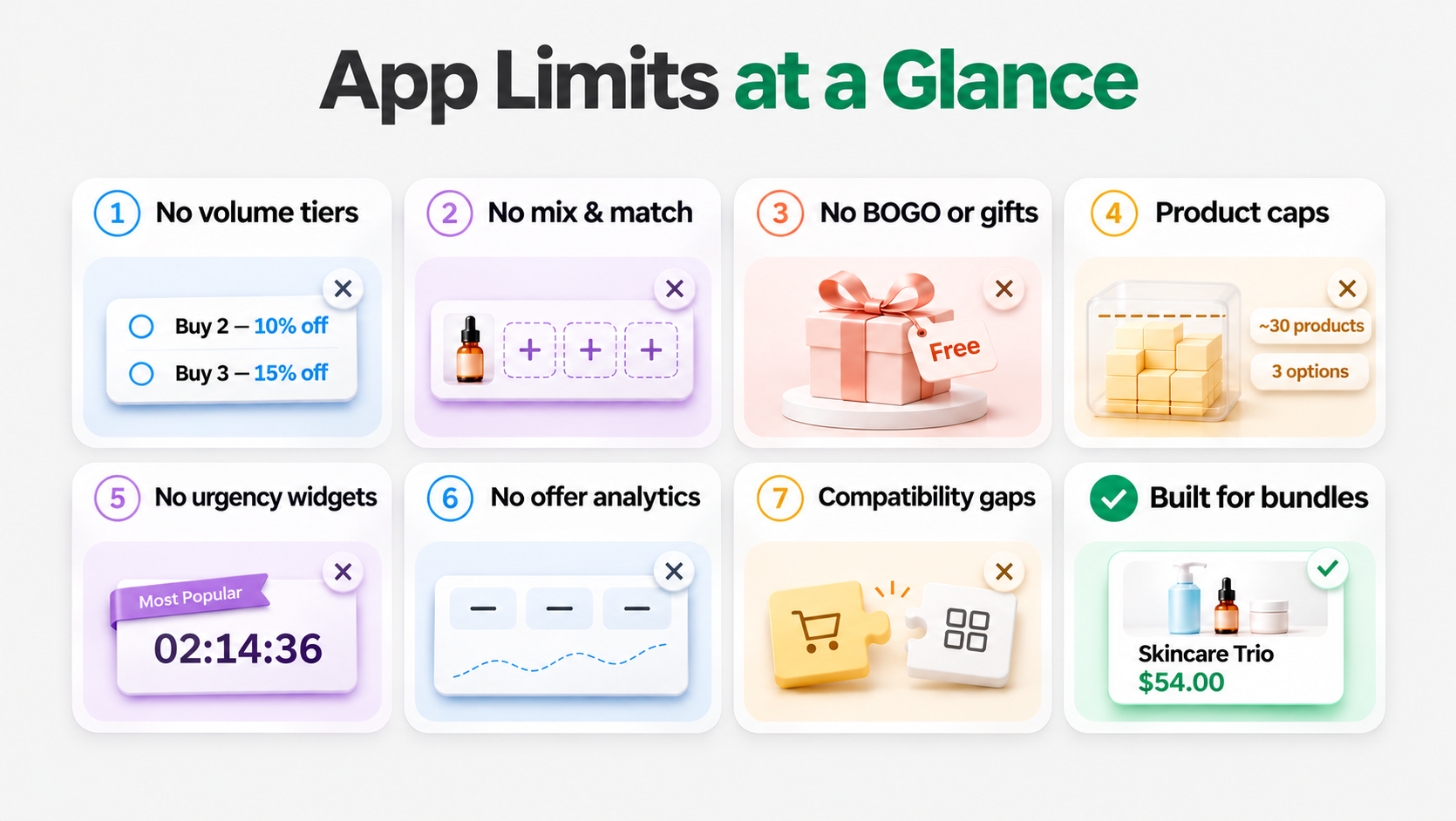
Merchants who outgrow the native app tend to hit one of these limits, based on Shopify's own documentation and recurring reports from the Shopify Community forum and App Store reviews:
- No quantity-break or volume-tier pricing. The native app builds fixed combinations, not a "buy 2, save 10%, buy 3, save 15%" tiered widget on a single product. That mechanic requires a dedicated app.
- No mix-and-match builder. Shopify's own documentation points merchants toward third-party apps for pick-your-own bundles rather than offering that flow natively.
- No Buy X Get Y or gift-with-purchase logic. The app sells predetermined combinations at a set price; it doesn't support "buy this, get that free" or a tier that unlocks a bonus item.
- Reported variant and product caps. A Shopify Community thread describes a limit of roughly 30 products and 3 variant options per bundle, which can bind a merchant building large, highly configurable sets. Verify current limits against Shopify's own documentation for your store, since community-reported caps can shift between updates.
- No urgency or merchandising widgets. There's no built-in countdown timer, sold-out tier overlay, or "most popular" badge to push a bundle's conversion rate.
- No per-offer analytics. The app places the bundle for sale; it doesn't give you offer-level impressions, add-to-cart rate, or a dashboard isolating how much revenue the bundle itself generated versus your baseline.
Checkout and app compatibility gaps. Confirm compatibility with your specific stack before relying on it for a launch-critical offer.
None of this makes the native app bad at what it does. It makes it narrow by design, built for the single, common case of a fixed combination rather than for merchandising experimentation.
That narrowness is also why it's hard to A/B test with the native app alone. Without offer-level impressions or conversion data, you're left comparing overall store revenue before and after launch, which mixes in every other variable running at the same time, from traffic shifts to seasonality.
See the offer types Shopify's native app doesn't buildPumper covers quantity breaks, mix and match, and Buy X Get Y alongside fixed-style product bundles, all from one dashboard.
|
What a Third-Party Bundle App Adds
"Third-party bundle app" isn't one feature set. It's a category, and individual apps in it vary widely in scope, pricing, and install footprint. Pumper Bundles is one example worth walking through concretely, not because it's the only option, but because it shows what the category can cover beyond a fixed combination.
More Offer Mechanics in One App
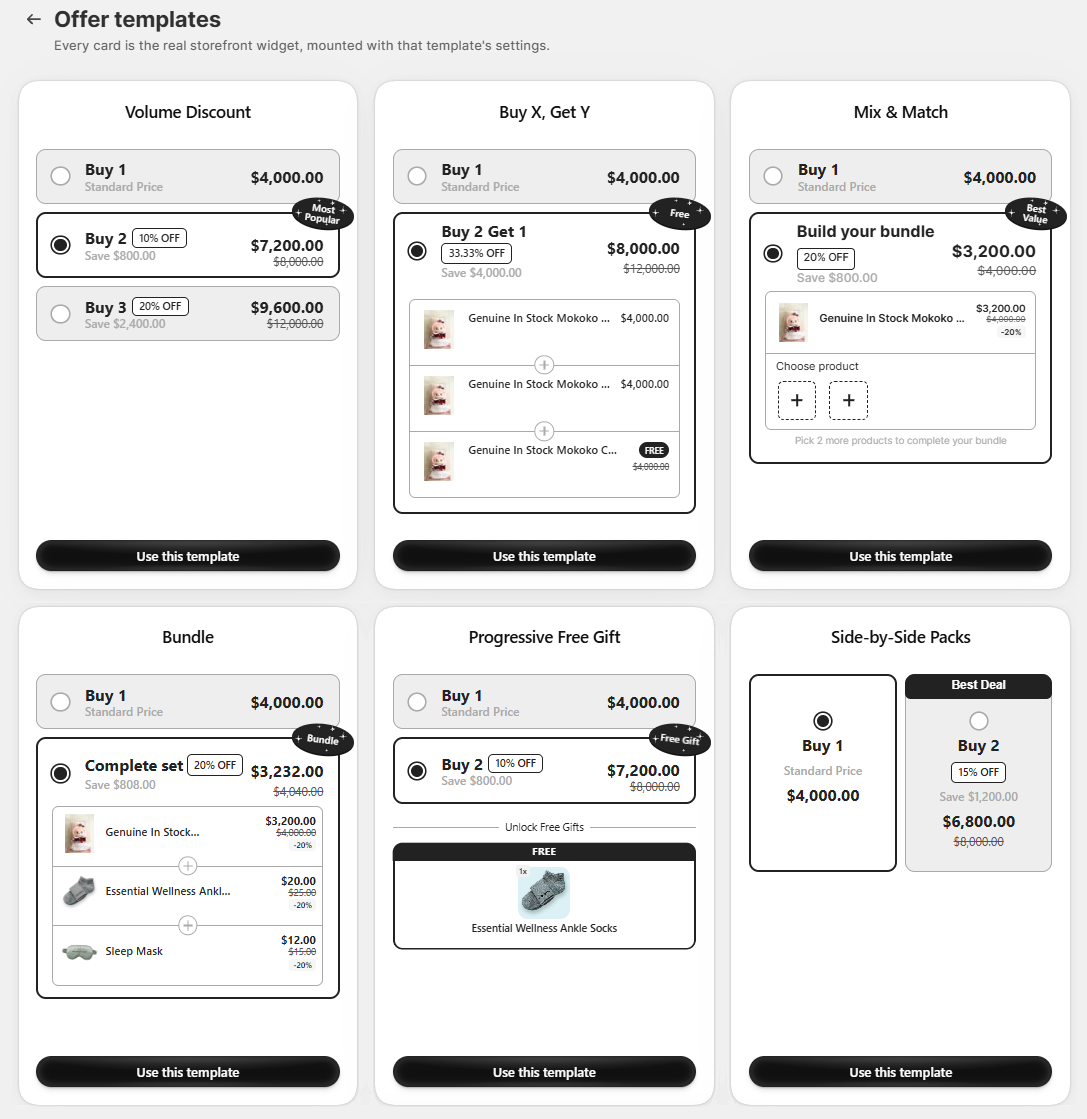
Pumper runs five distinct offer types from a single dashboard: Quantity Breaks (the tiered "buy more, save more" mechanic the native app doesn't have), Product Bundles (fixed combos of up to three products, closer to what the native app does), Bundle Themes (ready-made bundle templates for a fast launch), Mix & Match (a shopper-curated pool, which the native app explicitly doesn't support), and Buy X Get Y. A merchant who needs both a fixed gift set and a quantity-break ladder on different products doesn't need two separate apps for that.
Widget Placement and Merchandising Control
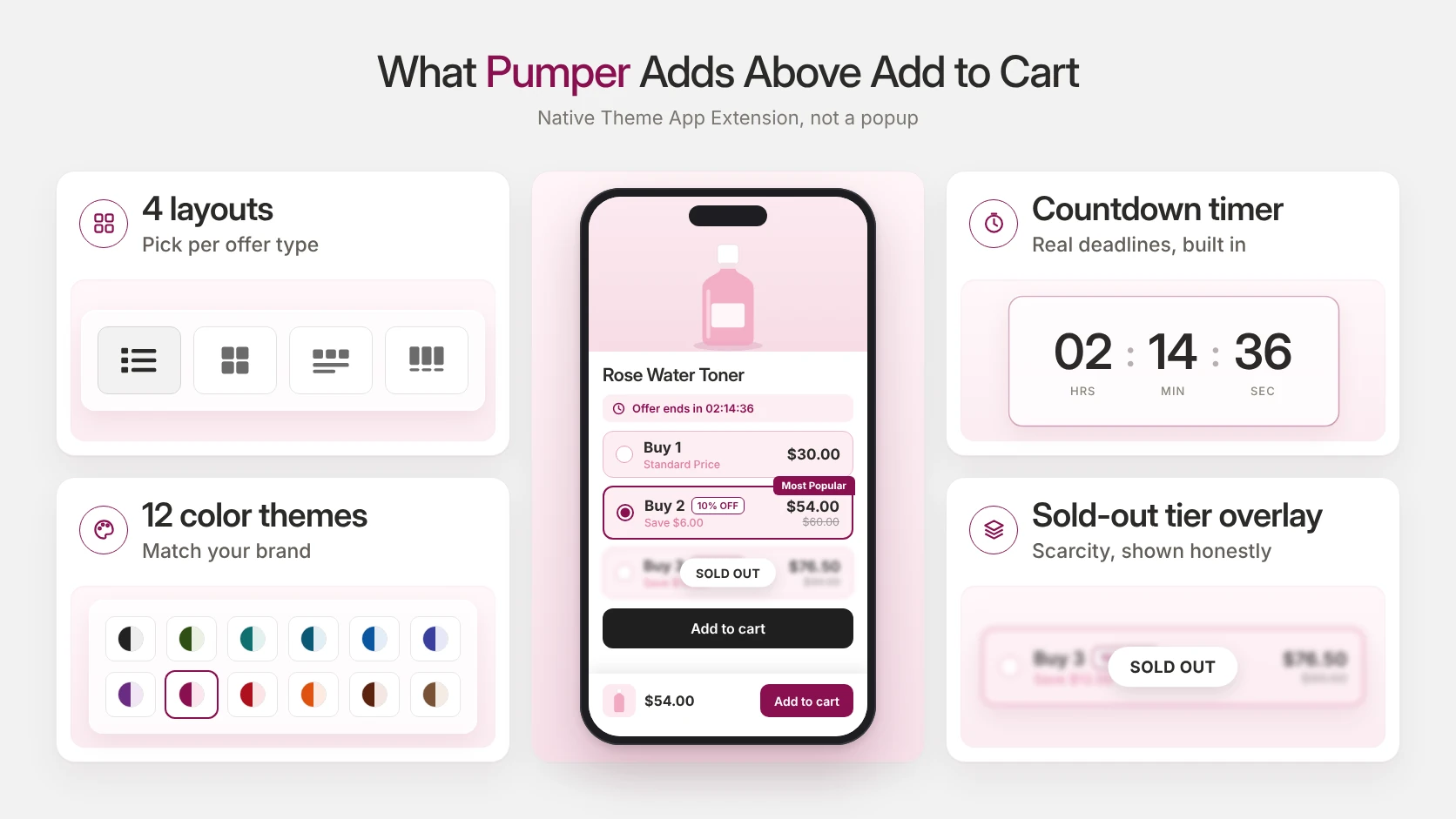
Pumper's widgets render above the Add to Cart button through native Shopify Theme App Extensions, with a choice of four layouts and twelve color themes, plus urgency features like a countdown timer, a sold-out tier overlay, and a sticky Add-to-Cart bar on mobile. None of these exist in the native app's current feature set.
Discount Flexibility Beyond a Single Fixed Price
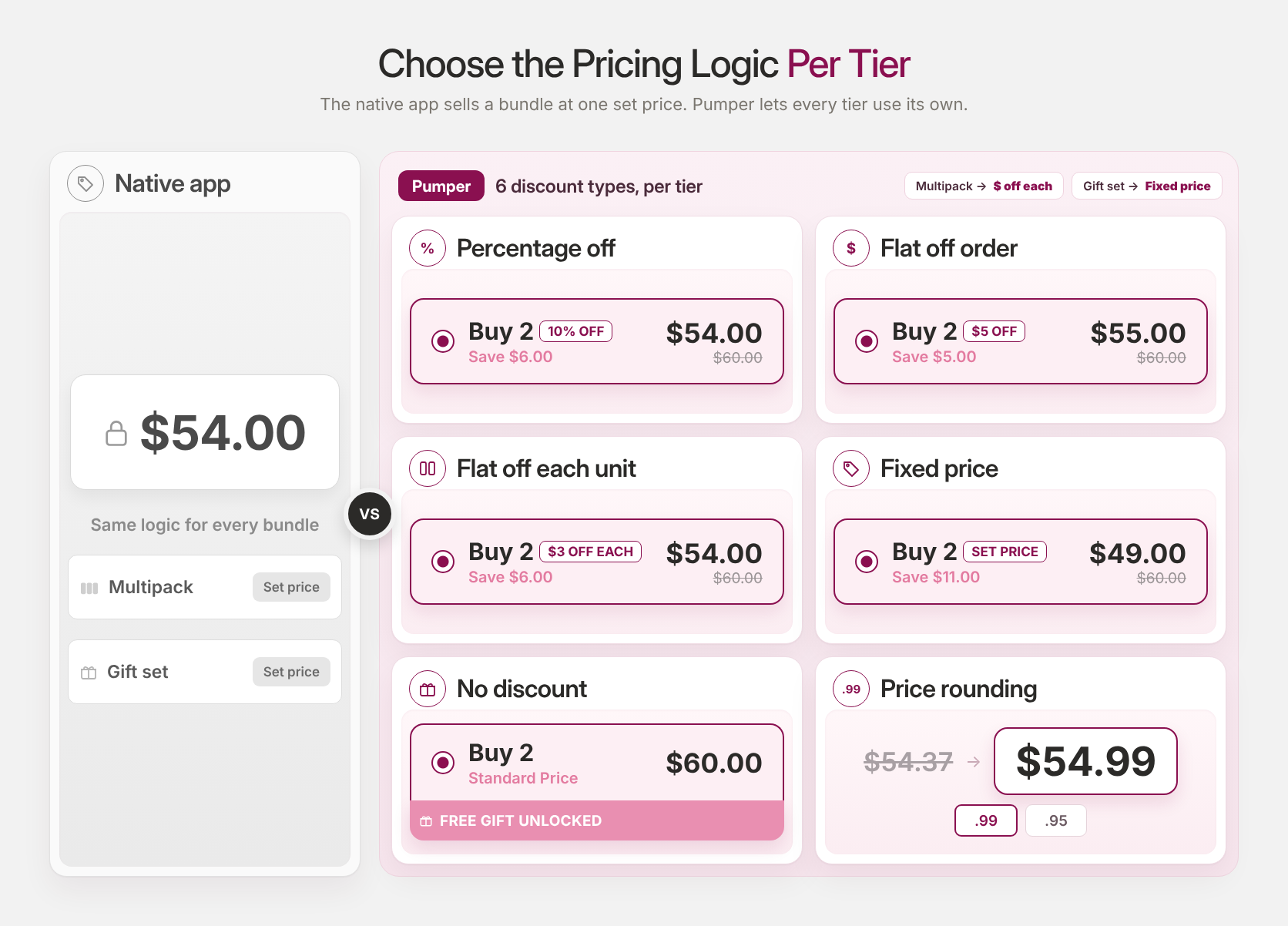
Where the native app sells a bundle at one set price, Pumper's discount types let you choose the pricing logic per tier: a percentage off, a flat amount off the order, aflat amount off each unit, a specific fixed price regardless of which variants a shopper picks, a no-discount tier used only to unlock a free gift or free shipping, and price rounding to clean .99 or .95 endings. That range matters most once you're running more than one bundle at a time and need different pricing logic for a consumable multipack versus a one-time gift set.
Add-Ons Layered on Top of Any Offer
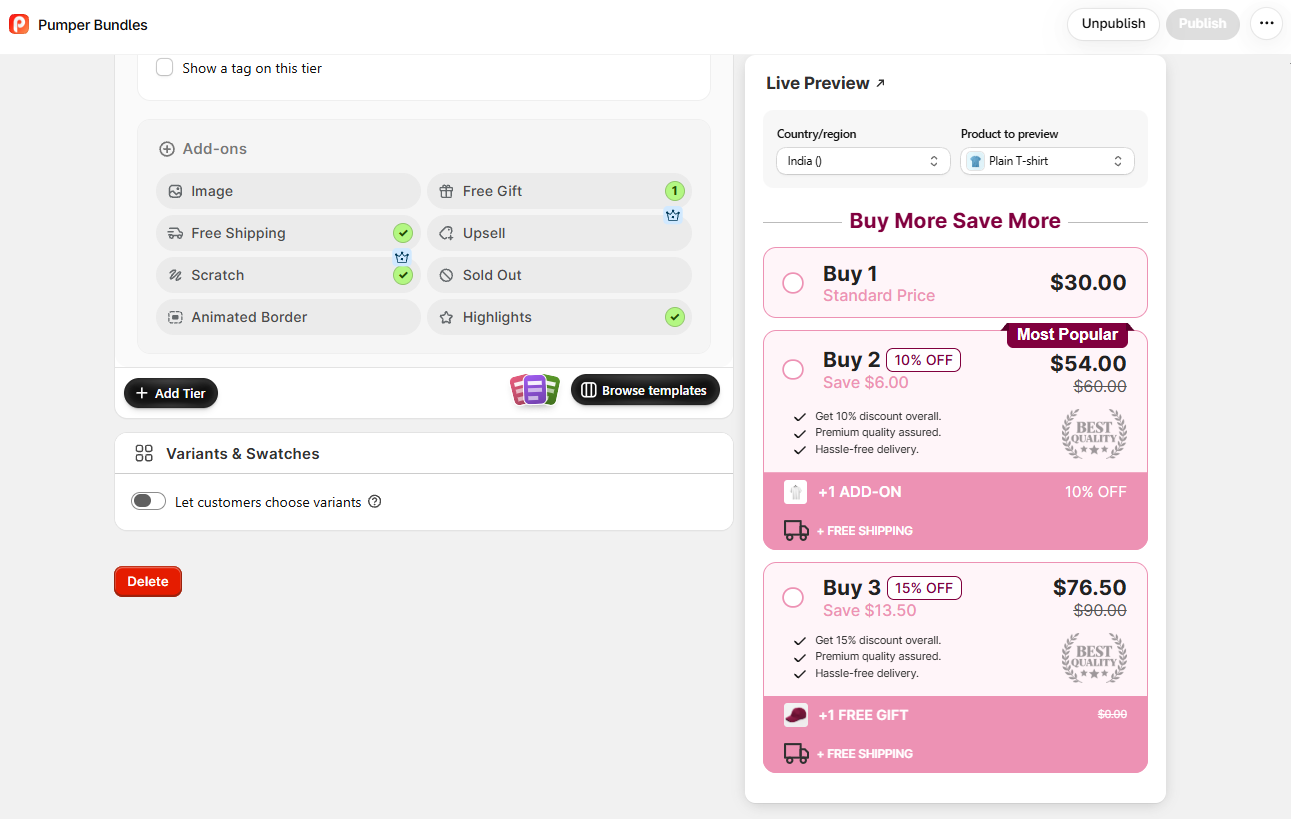
Free gifts and progressive free gifts (up to five, unlocking in sequence), free shipping on a selected tier, and Subscribe & Save as a one-time-versus-subscription toggle (needs a separate Shopify subscription app) can all sit on top of any of the five offer types. The native app has no equivalent add-on layer.
Per-Offer Analytics
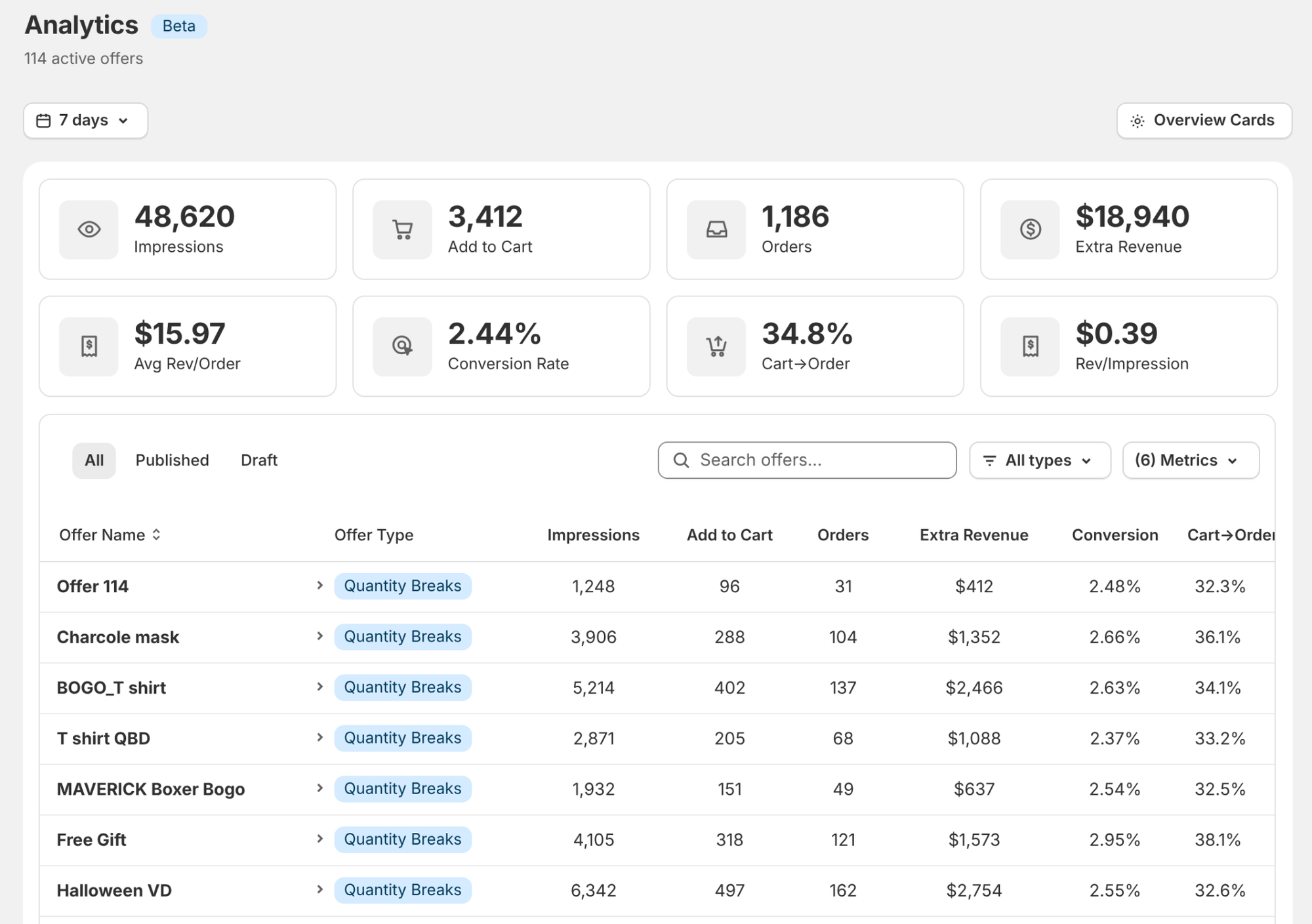
Pumper tracks impressions, add-to-carts, orders, revenue, and conversion rate for each offer individually, plus a revenue dashboard showing extra revenue generated this month, over the last 30 days, and all time. That answers a question the native app can't: whether a specific bundle is actually earning its shelf space.
To be clear about the trade-off: this breadth comes from a dedicated app with its own install, its own theme app blocks to activate, and its own pricing, which is real setup and cost that the free native tool doesn't carry.
Run quantity breaks and gift-with-purchase from one appPumper adds the mechanics Shopify's native bundles app doesn't build, plus per-offer analytics to see what's actually working.
|
Decision Framework: When Native Is Enough, When It Isn't
Match the tool to what you're actually trying to sell, not to feature counts.
- Stick with the native app if: you're selling a small number of predetermined combinations (a starter kit, a fixed multipack), your catalog is simple enough that the roughly 30-product and 3-option limits aren't a constraint, you don't need urgency or merchandising widgets, and you're not trying to measure each bundle's performance separately from your overall store analytics.
- Add a third-party app if: you need tiered quantity-break pricing on a single product, a shopper-curated mix-and-match pool, a Buy X Get Y mechanic, a free-gift ladder, urgency widgets tied to a real deadline, or offer-level analytics to judge whether a specific bundle is working.
- Run both if your use case genuinely splits: some merchants keep the native app for a handful of simple fixed sets while running a third-party app for the mechanics it doesn't cover, rather than migrating everything to one tool. Confirm the two don't conflict on the same product before launching that way, since app compatibility on a single product page isn't guaranteed.
- Reconsider either option if your catalog is genuinely large and highly configurable: at that scale, the native app's reported variant caps and the cost structure of some third-party apps both deserve a closer look before you commit.
Cost Comparison: Free Native vs Third-Party Pricing Models
Shopify Bundles costs nothing beyond your Shopify subscription, on any plan tier. That's the simplest comparison point, and it's a real advantage for a merchant whose only need is a basic fixed combination.
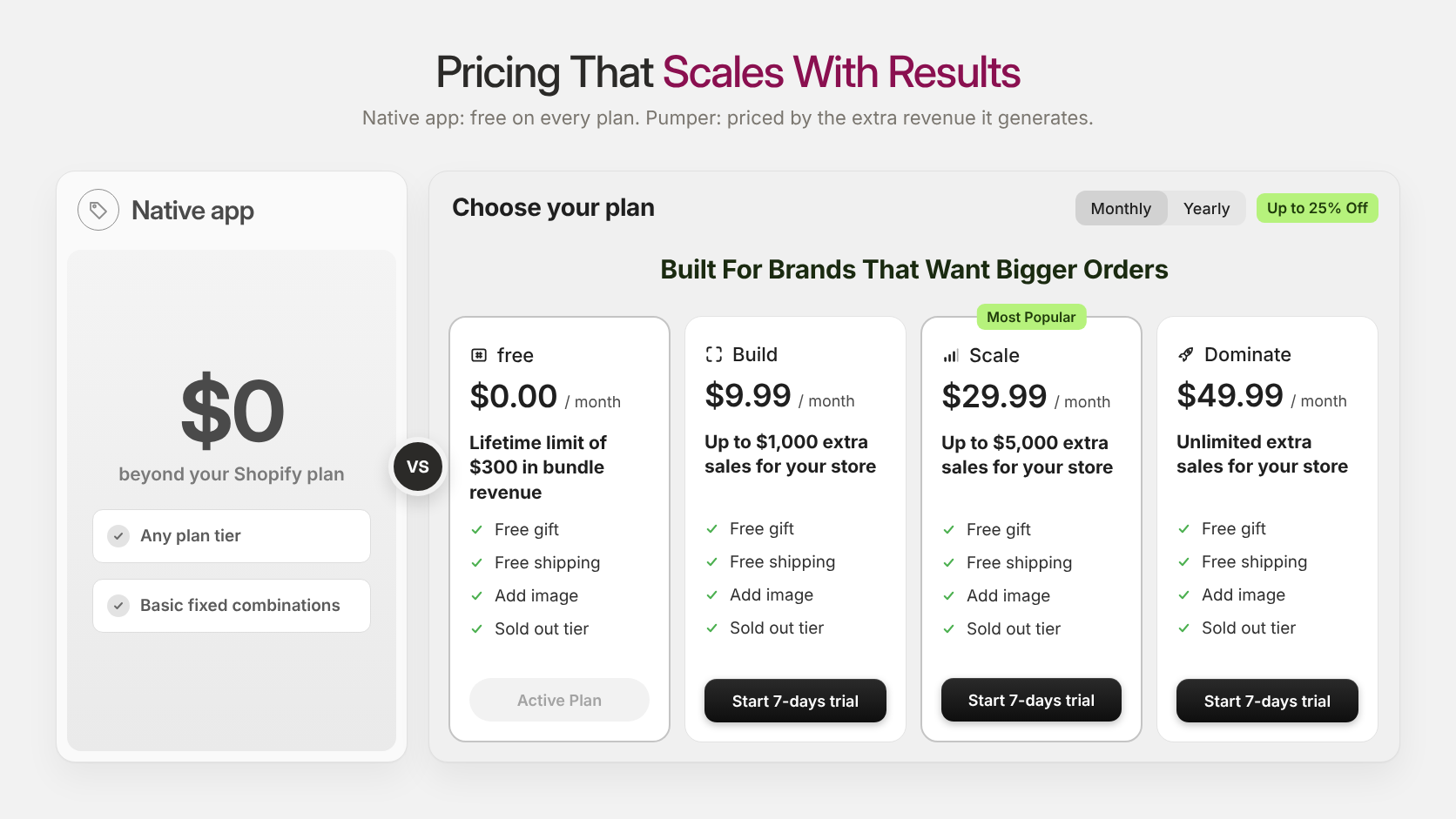
Third-party pricing varies by app and model. Pumper's plans are capped by extra revenue generated rather than by order count or feature access: Free up to $300 in extra sales, Starter at $9.99/month up to $1,000, Growth at $29.99/month up to $5,000, and Unlimited at $49.99/month with no cap. All paid tiers include a 7-day free trial. That model means the app effectively scales its cost with the revenue it's generating for you, rather than charging a flat fee regardless of results, which is worth checking against any third-party app you're evaluating since not every app prices this way.
What to Check Before You Install a Third-Party Bundle App
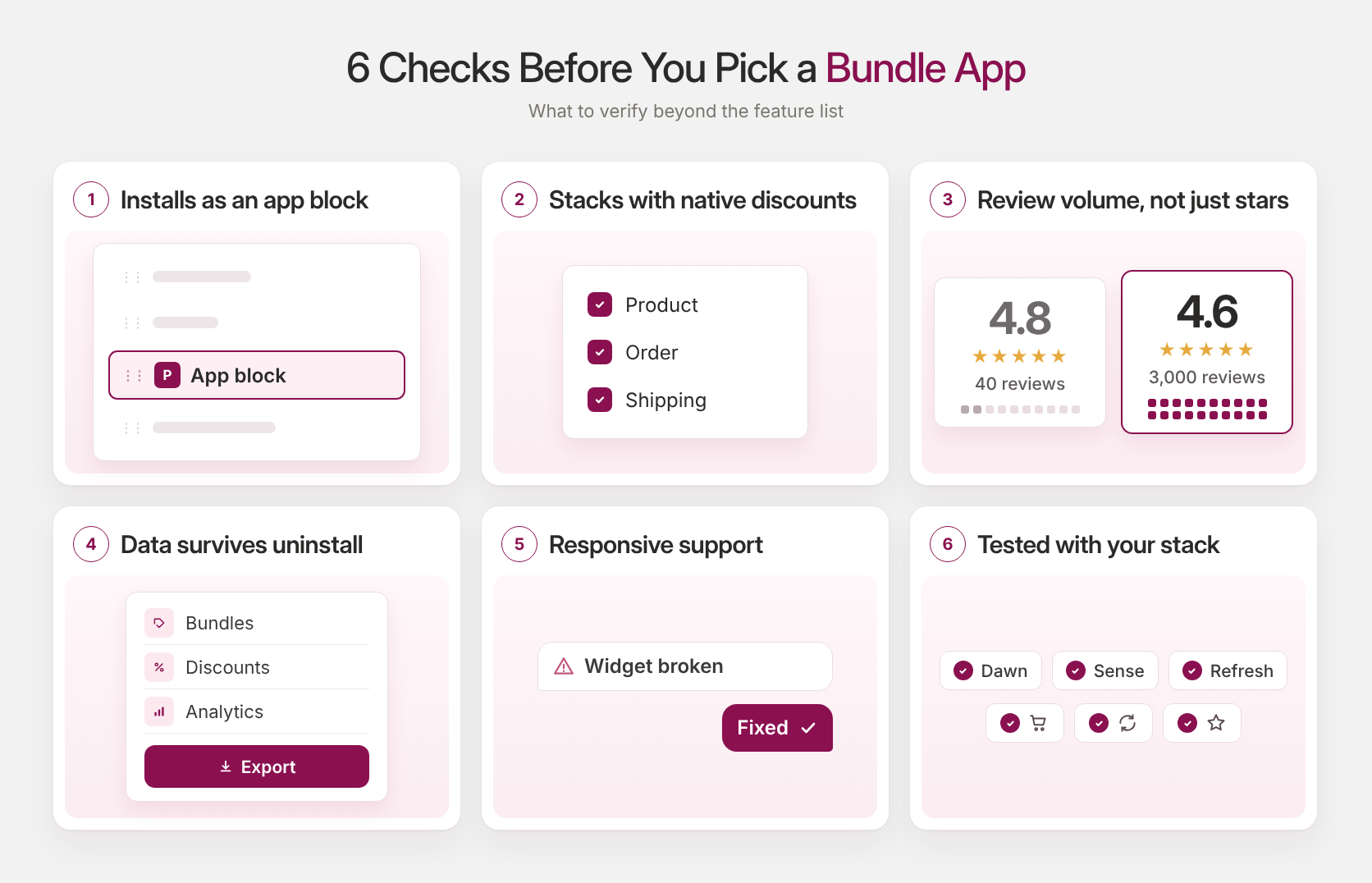
- How it installs. A modern Shopify app should use Theme App Extensions, activated as app blocks in your theme editor, rather than requiring manual theme code edits that break on your next theme update.
- Whether it stacks with Shopify's native discounts. Confirm the app has explicit settings for combining with Shopify's Product, Order, and Shipping discounts, rather than silently conflicting with a promotion you're already running.
- Review volume and recency, not just star rating. A 4.8-star app with 40 reviews and a 4.6-star app with 3,000 reviews are different risk profiles.
- What happens if you uninstall it? Ask whether your bundle configurations, discount logic, and historical analytics export or simply disappear, since that affects how reversible the decision is.
- Support responsiveness for setup and display issues, since a bundle widget that breaks during a sale costs more than the app's monthly fee.
Which theme and apps it's tested against. A bundle app that explicitly lists compatibility with your theme (Dawn, Sense, Refresh, and similar current Shopify themes) and your other installed apps (cart drawers, subscription apps, review widgets) is a safer bet than one that doesn't publish that list.
A Worked Example
This is an illustrative scenario to show how the decision plays out in practice.
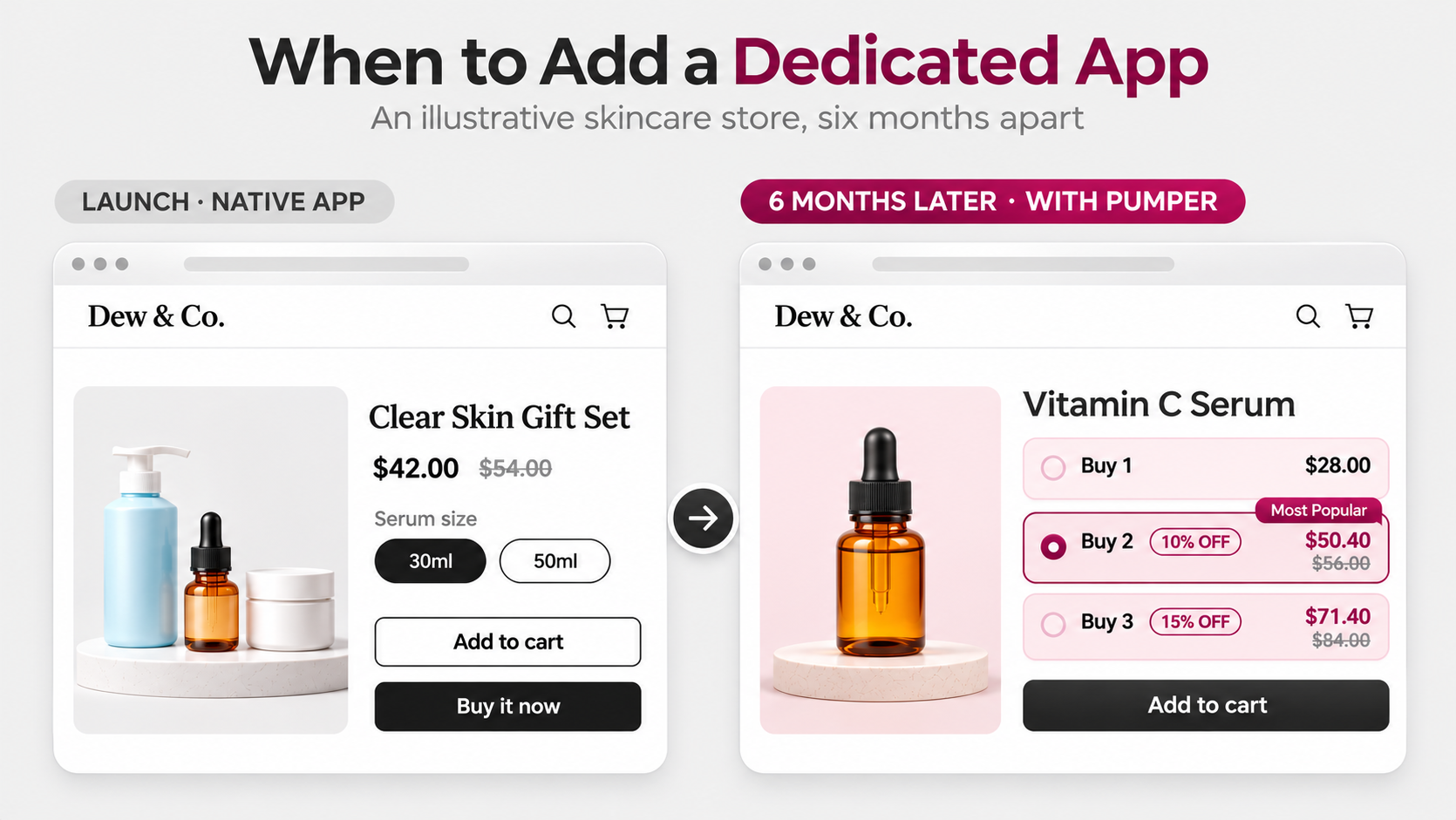
A skincare brand launches with one fixed gift set: a cleanser, serum, and moisturizer sold together at one price. The native Shopify Bundles app handles this cleanly, at no added cost, with inventory tied to whichever component runs out first.
Six months later, the brand wants to add a quantity-break tier on its best-selling serum ("buy 2, save 10%, buy 3, save 15%"), a mix-and-match box for its travel-size minis, and a way to see whether the gift set is actually outperforming the three products sold separately. None of that is available in the native app. At this point, adding a dedicated app like Pumper to run the new mechanics, while potentially keeping the original fixed set either in Shopify Bundles or recreated as a Product Bundle offer, makes more sense than trying to force the new mechanics into a tool that wasn't built for them.
Final Verdict
Shopify's native Bundles app is a genuinely useful, free tool for the specific job it does: fixed combinations and multipacks, with inventory handled automatically. It's not a weaker version of a third-party app; it's a narrower one, and for plenty of merchants, narrow is exactly enough. The decision to add a third-party app should come from a specific mechanic you need and the native app doesn't have: quantity breaks, mix and match, gift-with-purchase, urgency widgets, or offer-level analytics, not from an assumption that more features are automatically better. Pumper is one option built to cover those gaps with five offer types and a free plan to start testing on.
Start free and see which mechanics you actually needTest quantity breaks, mix and match, and gift-with-purchase against your own catalog on Pumper's free plan before committing to a paid tier.
|
FAQs
Can I use Shopify's native Bundles app and a third-party app at the same time?
Often yes, if they're applied to different products or offer types, but confirm there's no conflict on any single product page before launching that way. App compatibility on the same product isn't guaranteed across every combination.
Does Shopify's native Bundles app support discount codes?
The app's documentation focuses on fixed combinations sold at a set price rather than a discount-code-driven mechanic. If you need automatic tiered discounts or code-based promotions layered onto a bundle, that typically requires a third-party app.
Is the native app free forever, or does it have hidden costs?
It's included on every Shopify plan at no additional charge. Your cost is whatever Shopify plan you're already paying for, not an extra line item for bundling specifically.
What happens to my bundles if I switch from the native app to a third-party one?
This depends on the third-party app's migration tooling and isn't something to assume works smoothly. Check the specific app's documentation or support team before migrating an active bundle, especially one with live inventory tied to it.
Does the native app work with Shopify POS?
Reviewers generally describe POS compatibility as a strength of the native app, since it's a first-party Shopify tool. Confirm current POS behavior for bundles against Shopify's own documentation if in-store sales are a meaningful share of your revenue.
How do I know if my catalog is too complex for the native app?
If you're running into the reported roughly 30-product or 3-variant-option limits, need pricing that changes with quantity rather than a fixed combination, or want shoppers to build their own set from a pool, that's a sign to evaluate a dedicated app.