



You've probably noticed it happen to you before you ever thought about it for your own store. You're buying protein powder, and the page shows you three boxes: 1 for $34.99, 2 for $59.99, 3 for $79.99. Suddenly you're doing quick math in your head, and you're adding two.
That's a volume discount at work, and it's one of the few pricing tactics that actually makes your customer feel smart for spending more. You're not tricking anyone. You're just making the math obvious enough that a bigger cart becomes the easy choice.
If you run a Shopify store, this guide walks you through everything: what volume discounts actually are, the different structures you can build, the math behind pricing them so you don't quietly bleed margin, real setup steps, and the mistakes that turn a good idea into a discount code nobody uses. You'll come out of this with a plan you can implement this week, not just a list of tactics.
Let’s dive right in!
Key Takeaways
- Volume discounts (also called quantity breaks or tiered pricing) reward shoppers for buying more in a single order; directionally, industry reporting puts a well-structured tier ladder's AOV lift in the 15-25% range, though exact figures vary by category and aren't independently verified here.
- The two most common formats are quantity breaks (buy more units, save more per unit) and threshold-based bundles (spend more, unlock a gift or a bigger percentage off).
- Your discount tiers need to be priced against your actual margin, not picked because "10%, 15%, 20% looks clean." The guide below shows the math.
- Shopify's native discount tools handle basic percentage-off codes, but most merchants running real tiered pricing use a dedicated app because native discounts can't render a visual widget with multiple tiers on the product page.
- Volume discounts work best paired with clear, honest savings math and a widget placed where the shopper is already deciding, not buried in a banner they'll scroll past.
What Is a Shopify Volume Discount, Exactly?
A volume discount is a pricing rule that gives the shopper a lower per-unit price (or a bonus item, or a percentage off) as they add more quantity or more spend to their cart. On Shopify specifically, this usually shows up as a widget on the product page: a set of tiers, like "Buy 1," "Buy 2," "Buy 3," each with its own price and its own savings badge.
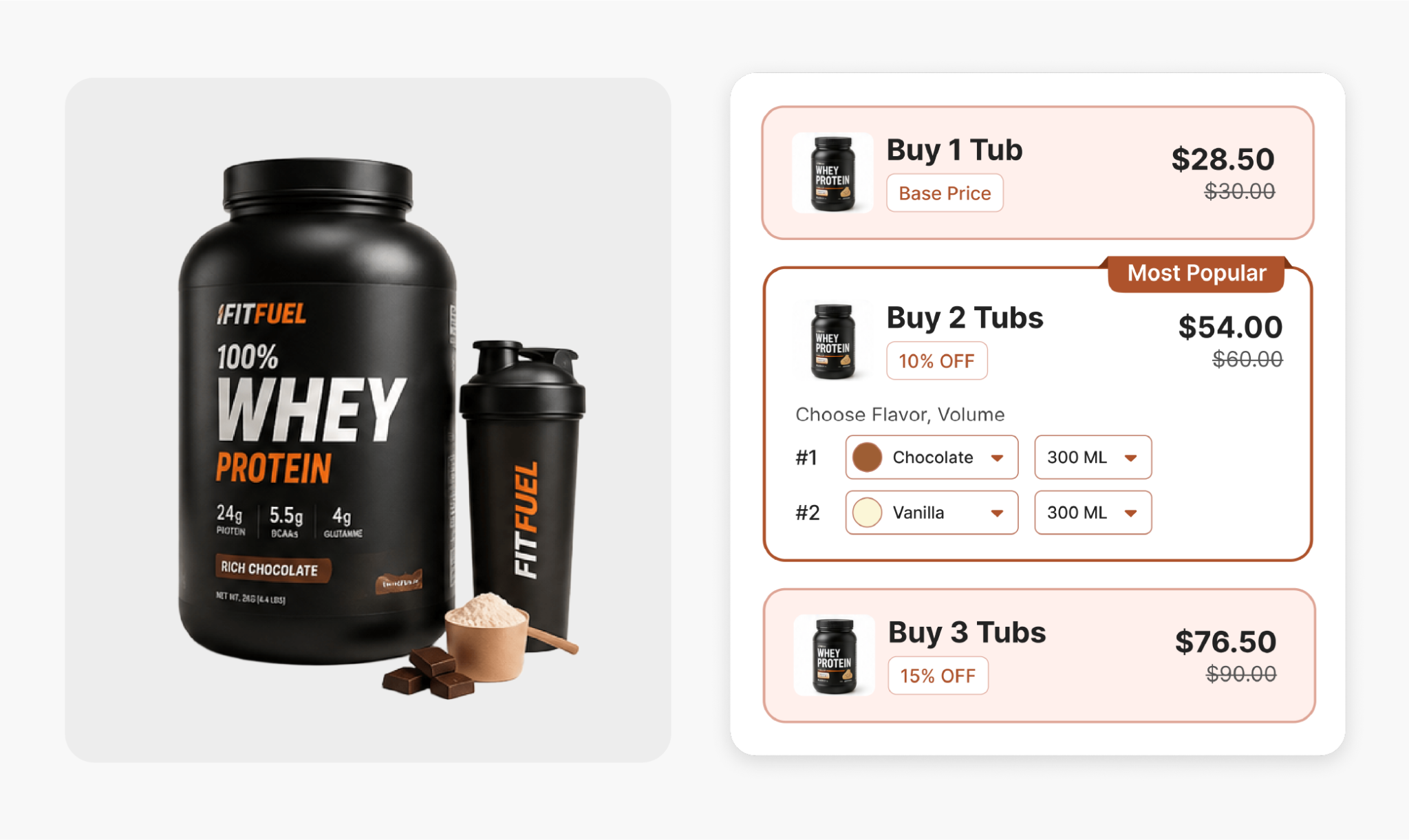
This is different from a sitewide sale or a single discount code. A sitewide 20% off promotion discounts everyone equally, whether they were buying one item or five. A volume discount only rewards the behavior you actually want: a bigger single order. You're not giving away margin to someone who was going to buy one bottle anyway. You're giving it to the person who was on the fence about a second one.
That distinction matters more than it sounds. Average order value, or AOV, is the average dollar amount of a single transaction on your store. Fulfillment provider Red Stag's 2026 Shopify benchmark data puts the median Shopify store AOV around $85, with the top quartile of stores clearing $180 and the bottom quartile sitting under $50. A meaningful part of it comes down to whether the store gives shoppers a reason to add a second or third item before checkout.
Why the Psychology Works
Shoppers aren't doing a spreadsheet-level cost-benefit analysis at checkout. They're pattern-matching against a visible anchor: three prices, side by side, with the middle or largest option clearly marked as the best deal. Once that anchor is visible, "buy 2" stops feeling like an upsell and starts feeling like the obvious, slightly savvy choice.
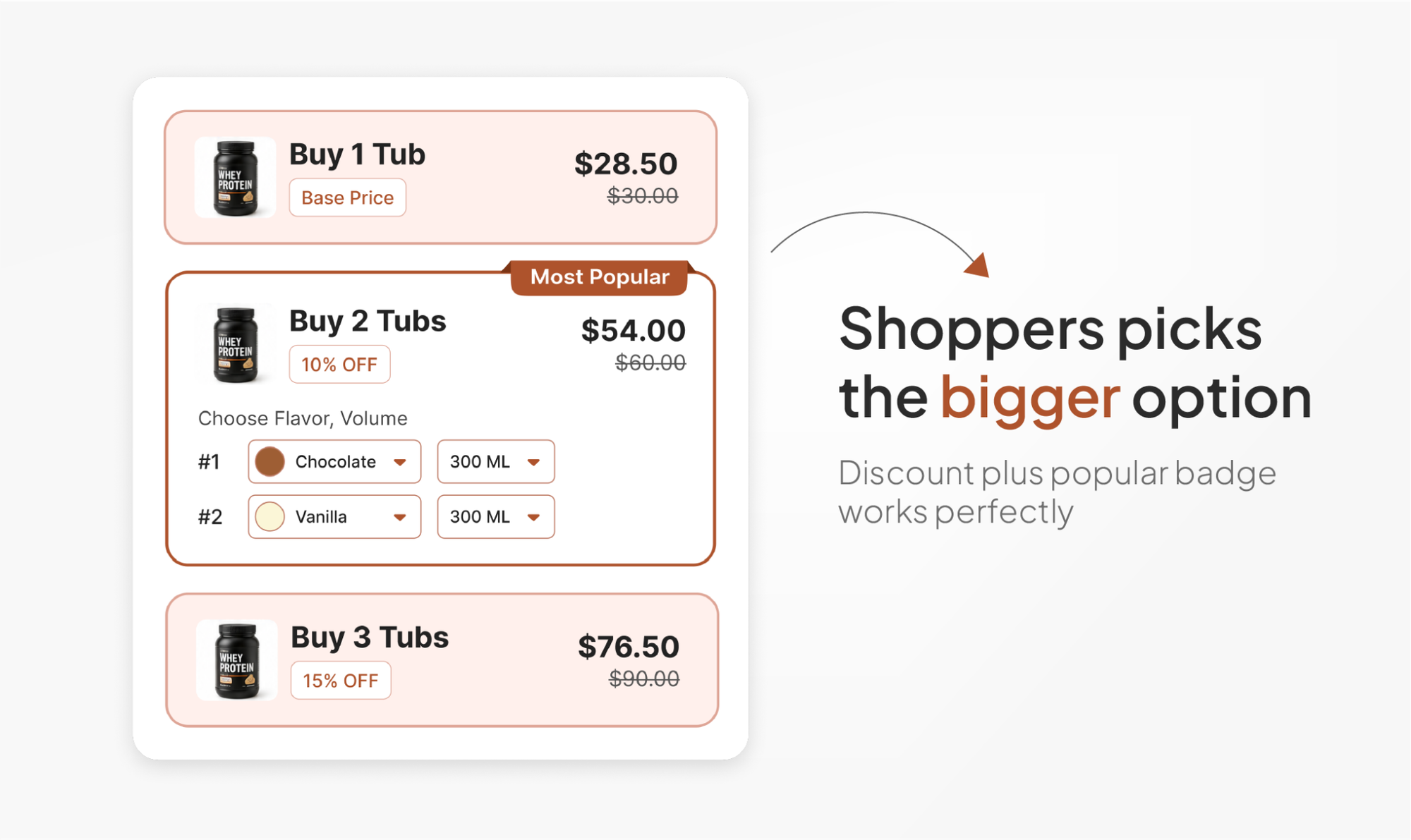
Behavioral pricing coverage on buy-one-get-one offers backs this up from a different angle: shoppers reportedly purchase substantially more product under a BOGO-free structure than under an equivalent percentage-off deal, even when the actual dollar savings work out close to the same. That's the same principle a volume discount widget leans on: make the bigger option visually and cognitively easier to pick than the smaller one.
The Main Types of Shopify Volume Discount Structures
There isn't one "volume discount." There are several structures, and picking the right one for your product is most of the work.
1. Quantity Breaks (Buy More, Save More)
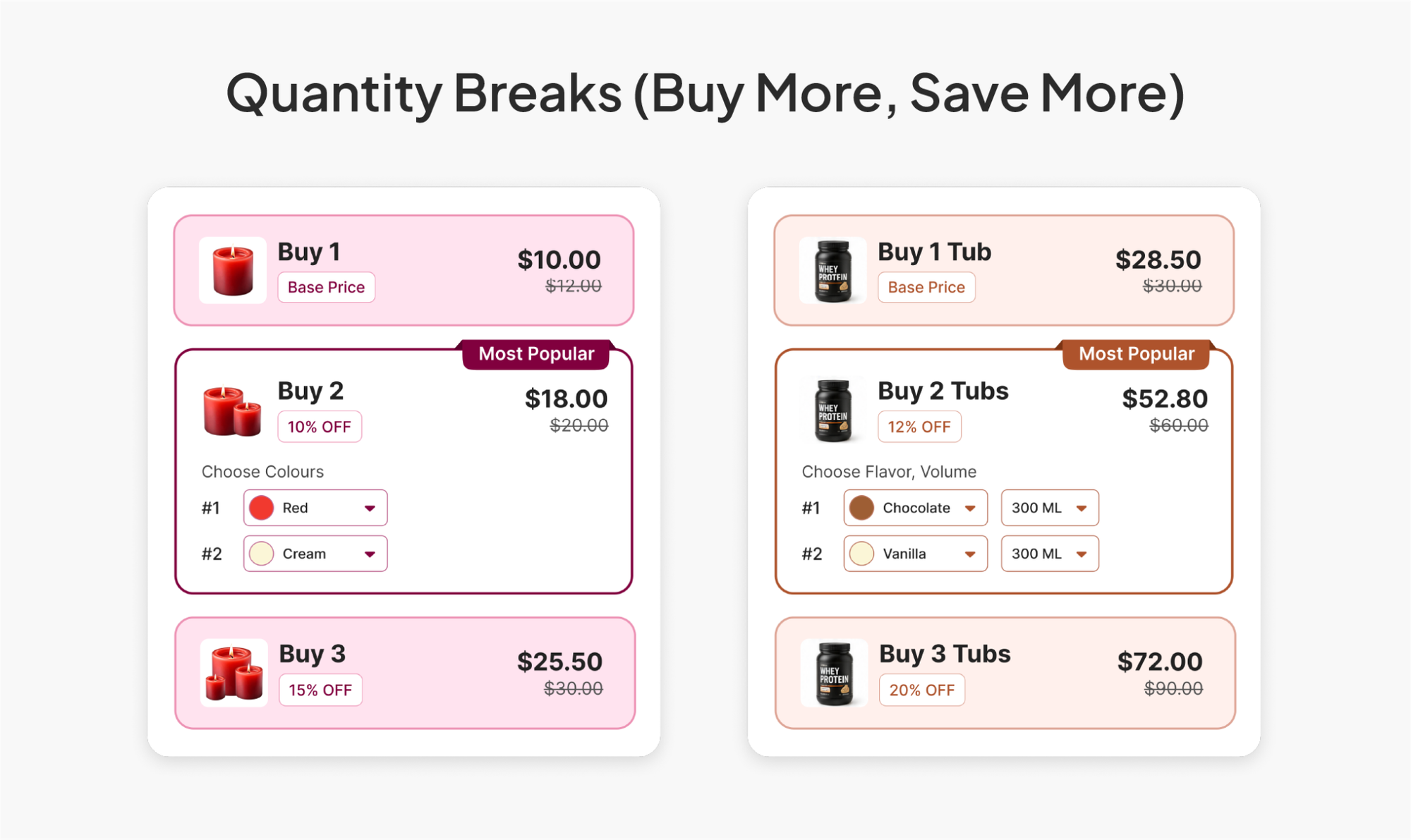
This is the classic structure: set two to four quantity tiers, and increase the discount at each tier. A candle brand might run 1 candle at full price, 2 candles at 10% off, 3 candles at 15% off. A supplement brand might run 1 bottle full price, 2 bottles at 12% off, 3 bottles at 20% off, leaning into the fact that customers are already buying on a repeat cycle.
This works best for products people naturally buy in multiples: consumables, supplements, skincare, socks, candles, anything with a repeat-purchase pattern where "just get two" is a believable next thought.
2. BOGO (Buy One, Get One)
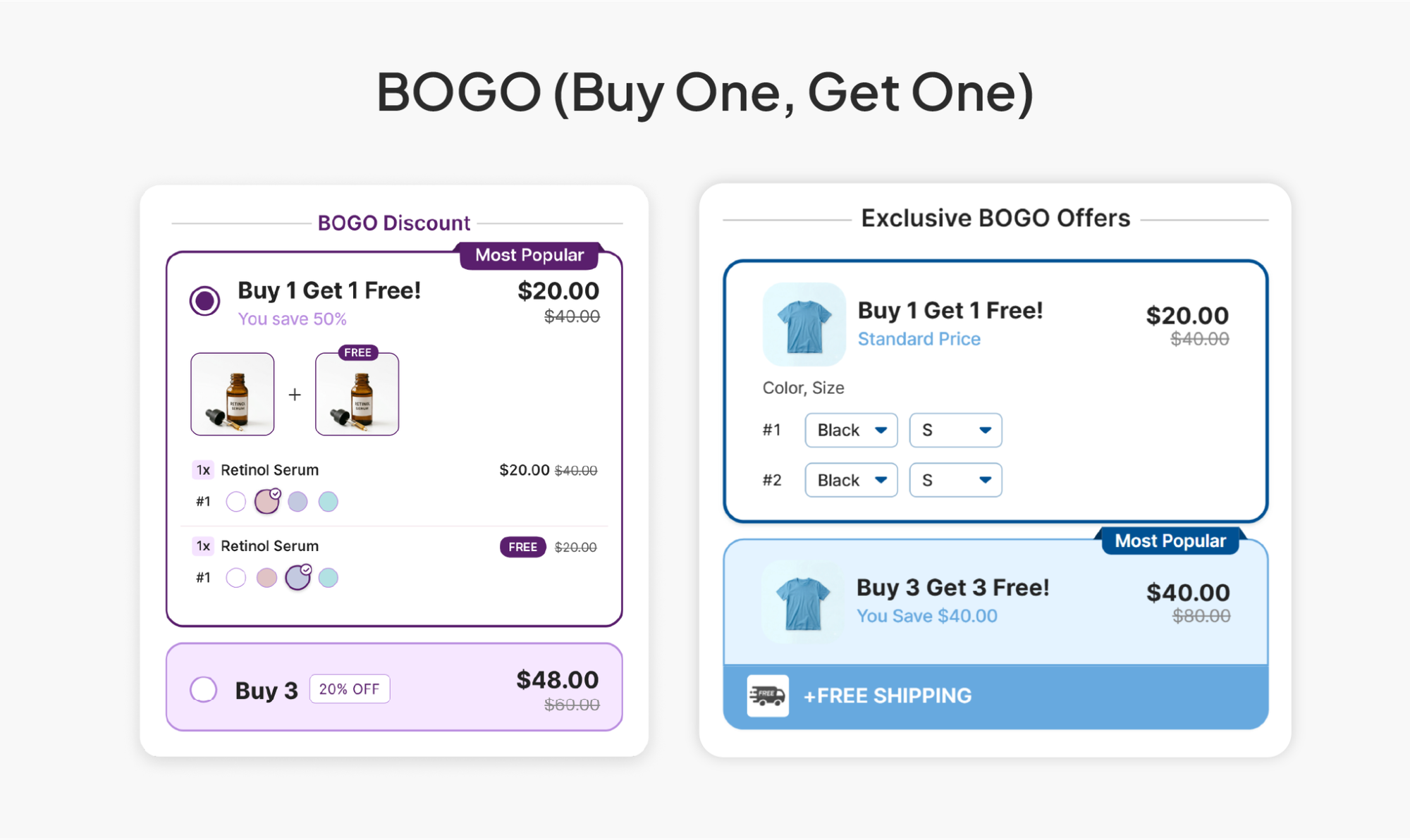
BOGO offers can run as free, at a percentage off, or as "buy 2, get 2." You can also structure it cross-product, where buying Product A unlocks a discount on Product B, which is a useful way to move a slower-selling item alongside a bestseller.
BOGO tends to outperform straight percentage-off in categories with strong gifting or pairing behavior: apparel, accessories, anything where "one for me, one for a friend" is a natural thought. It also tends to work well in beauty and personal care, where margins are typically high enough (often 70% or more on hero SKUs) that giving away a second unit doesn't erode profit the way it would on a lower-margin product.x
3. Threshold-Based Free Gifts
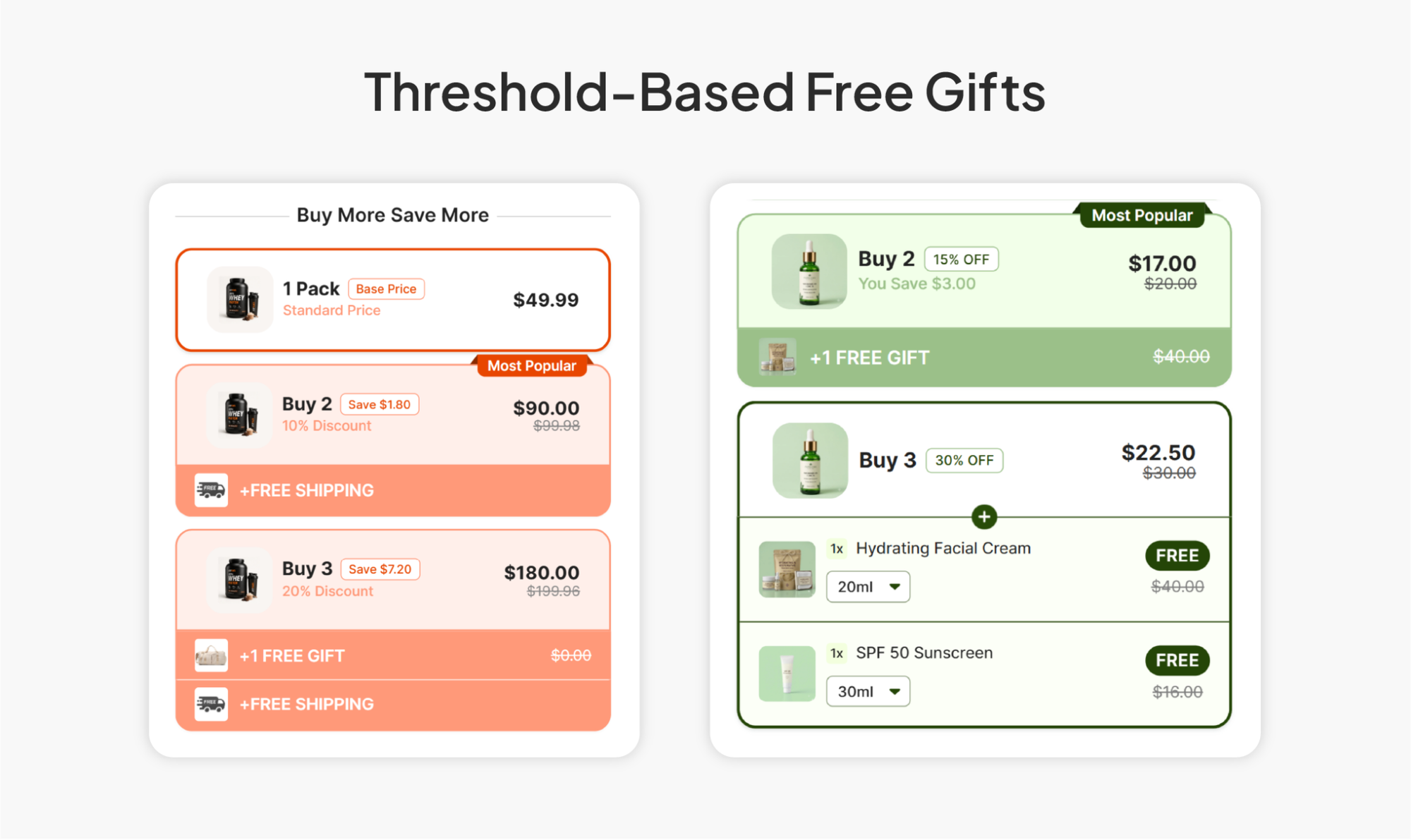
Instead of discounting the units in the cart, you give the shopper a free item once they cross a spend or quantity threshold. Spend $75, get a free travel-size version of your bestseller. Buy 3, unlock a bonus product.
This structure is worth considering when you want to protect your headline price (nothing on the page looks "discounted," which matters for brands that don't want to look promotional) while still giving shoppers a concrete reason to add one more thing to the cart.
4. Bundle & Save (Mix and Match)
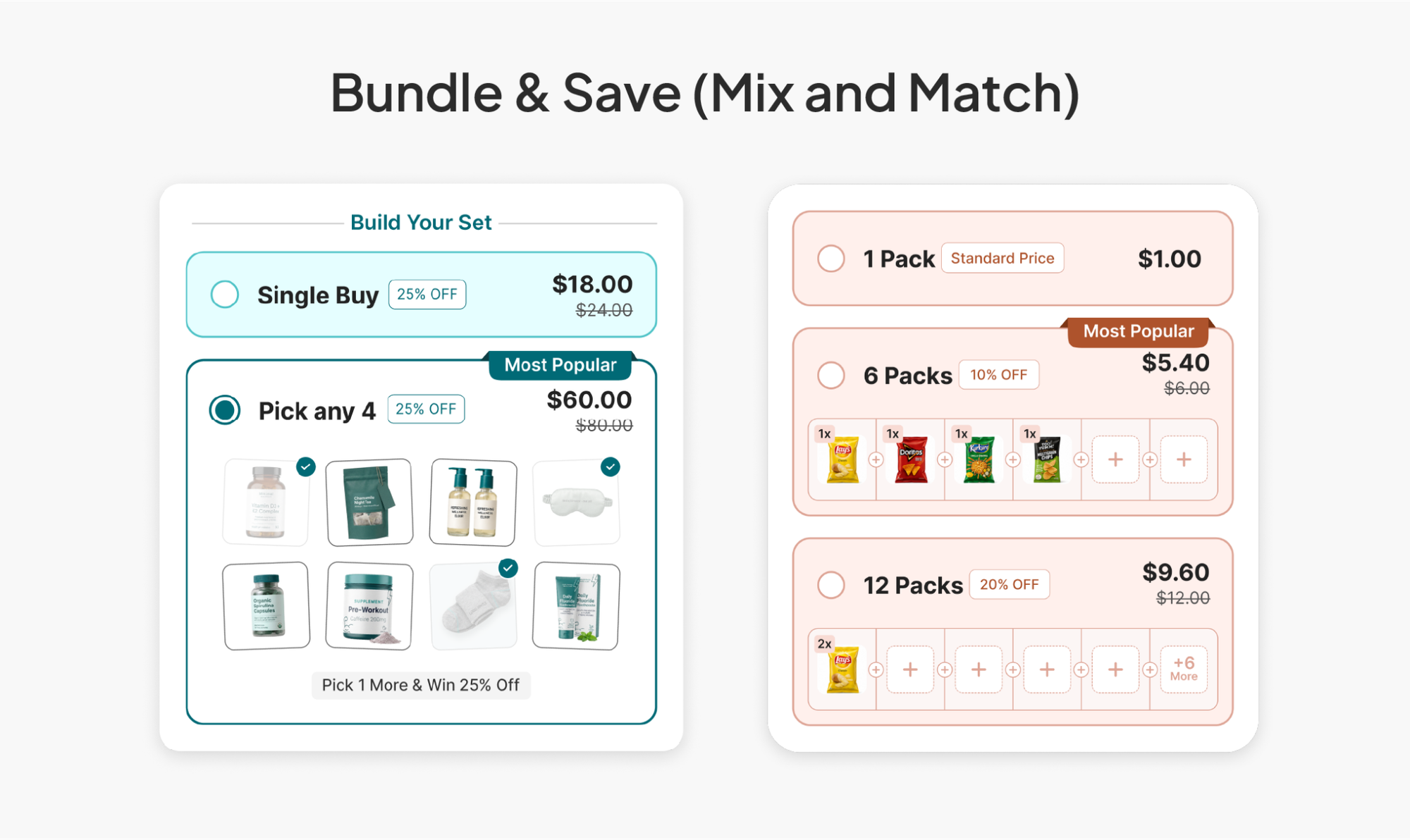
Bundle offers let the shopper pick which products go into a predefined bundle structure, usually with a combined discount once the bundle is complete. This is the natural fit for stores with genuinely complementary products: a skincare "starter kit" where the customer picks their cleanser, serum, and moisturizer, or a gift-set structure built around a seasonal theme.
The difference from quantity breaks is important: quantity breaks reward buying more of the *same* thing, while bundles reward buying a *combination* of different things. If your catalog has natural pairings (a stand and its accessory, a base product and its refill), bundles usually convert better than trying to force those items into a quantity-break structure.
5. Subscribe & Save Layered on Top
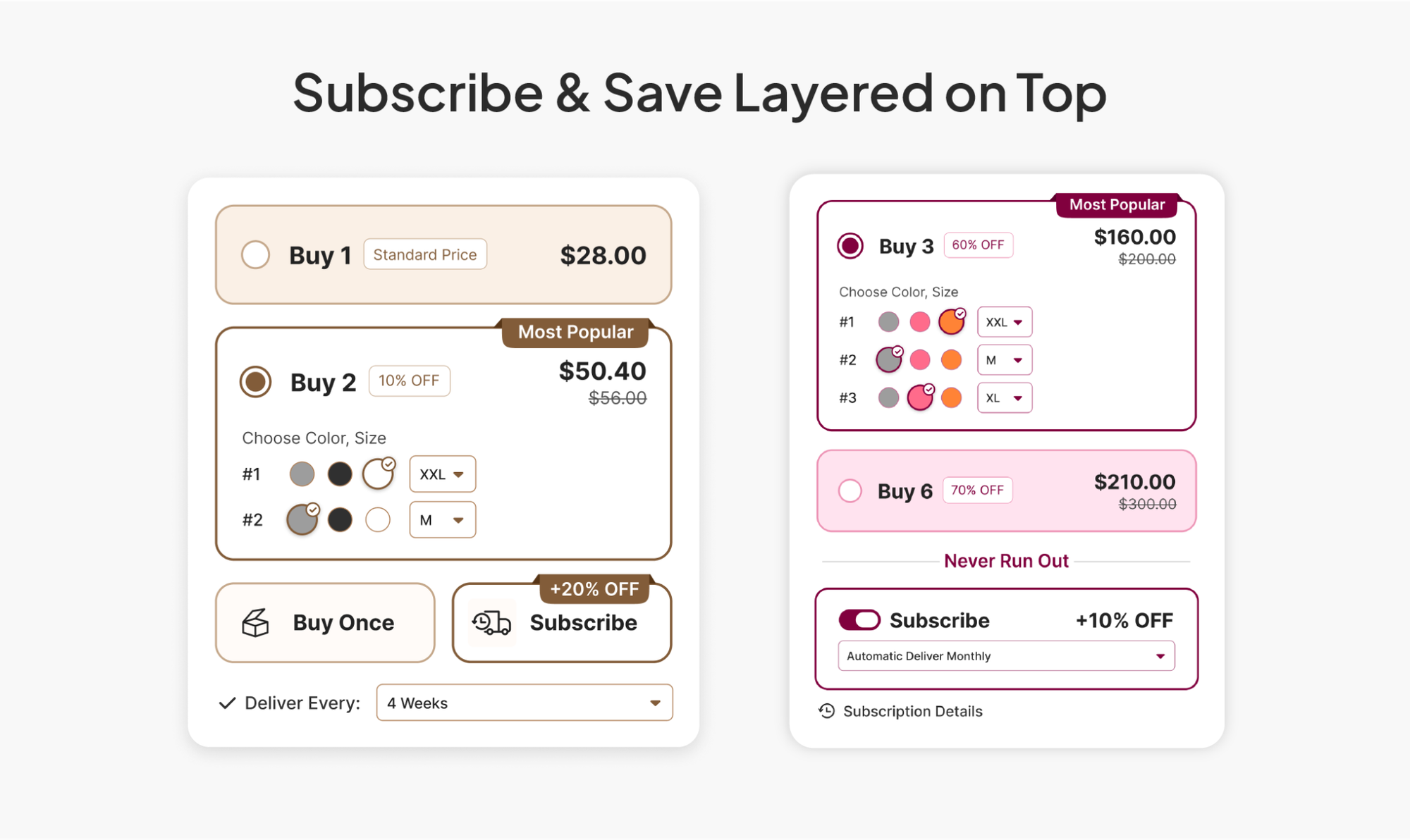
For consumable products, you can layer a subscription option on top of any of the above. The shopper sees a toggle: one-time purchase versus subscribe and save, with the subscription option carrying its own discount for recurring delivery. This isn't strictly a "volume" discount in the single-order sense, but it compounds the same idea: reward the customer for committing to more, whether that's more units now or more orders over time.
6. Post-Purchase Upsells: The Sixth Lever
Everything above happens before checkout. But there's a second moment worth building for: right after the customer has already paid. A post-purchase upsell offers one more relevant product, an upgrade, or an add-on, on the order confirmation page, before the customer ever leaves your site.
This works because the friction that normally kills a second purchase (re-entering payment details, going through checkout again) is gone. The payment method is already on file. Confirmation-page take rates are around 10-16%. Compare that to follow-up email upsells, which industry sources put closer to 1-3%, and it's clear why this moment deserves its own strategy rather than getting left out of your AOV plan entirely.
This is one of the six offer types built into Pumper Bundles, which is worth mentioning here because most volume discount apps stop at the product page. Pairing a pre-checkout quantity break with a post-purchase upsell means you're working both sides of the transaction instead of just one.
|
Setting tiers up is the easy half. Pumper Bundles is where you price them to still make money. Try Pumper for Free Explore Volume Discounts 2 min setup · No code required · Free plan |
How to Price Your Volume Discount Tiers Without Losing Margin
This is the part most guides skip, and it's the part that actually determines whether your volume discount makes you money or just makes your average order value number look good while your net margin quietly drops.
Start With Your True Margin, Not Your List Price
Before you set a single discount percentage, know your gross margin per unit after landed cost (product cost, fulfillment, payment processing).
If a $40 product costs you $16 to produce and ship, your gross margin is $24, or 60%. That 60% is the ceiling you're working with. A discount tier that eats into that margin needs to be justified by either a lower per-order fulfillment cost (shipping one box with 3 items instead of three separate orders) or a genuine increase in customer lifetime value from the larger purchase.
Say you sell a $28 skincare serum with a 65% gross margin, meaning it costs you roughly $9.80 to produce and ship, leaving $18.20 in gross profit per unit at full price.
Understanding the Pricing With Example
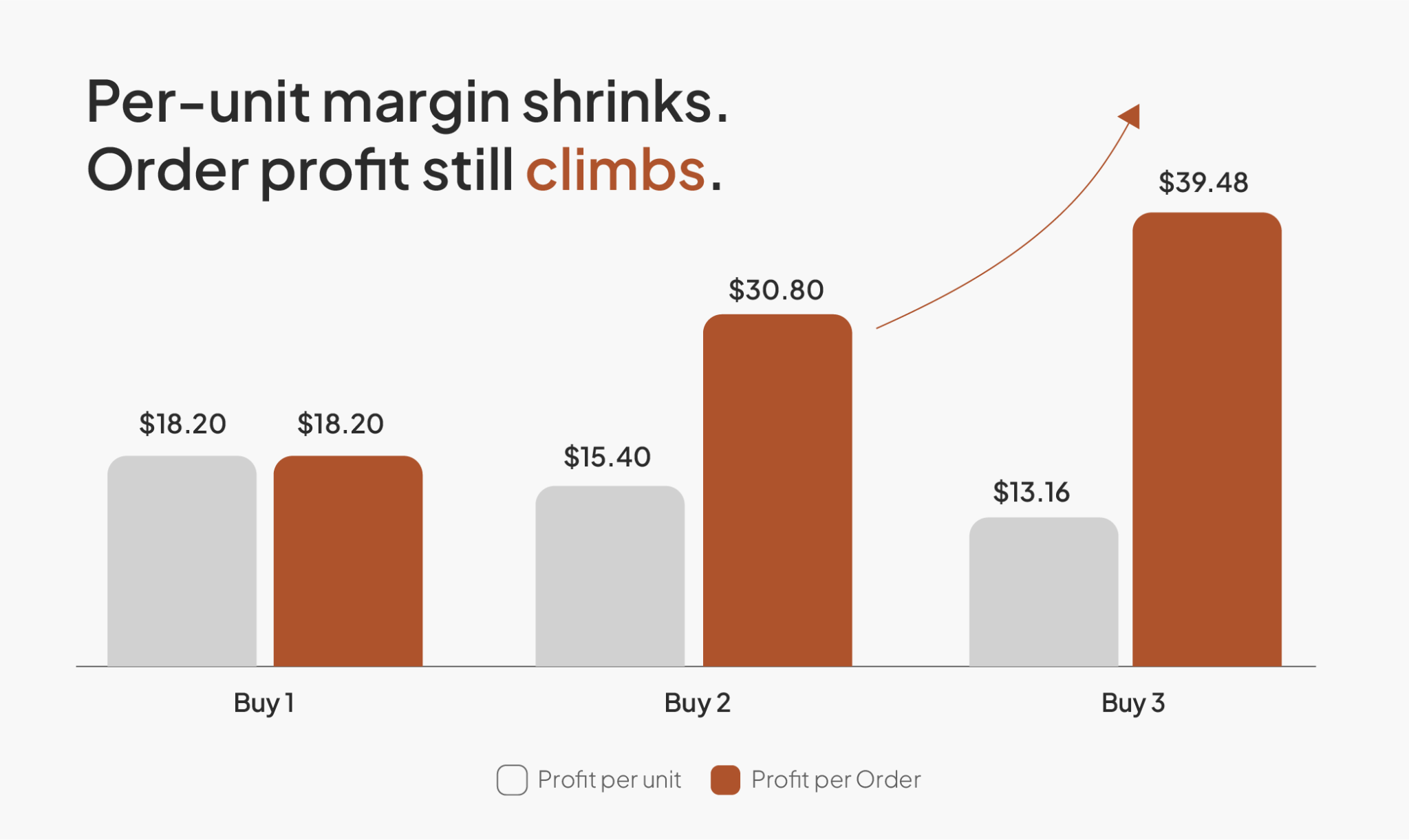
You're considering a quantity-break structure: buy 2, save 10%; buy 3, save 18%.
Tier | Price per unit | Total price | Gross profit per unit | Total gross profit |
1 unit | $28.00 | $28.00 | $18.20 | $18.20 |
2 units | $25.20 | $50.40 | $15.40 | $30.80 |
3 units | $22.96 | $68.88 | $13.16 | $39.48 |
Even after the discount, total gross profit still climbs at every tier, because you're keeping a larger share of a bigger number. The per-unit margin shrinks, but the order-level profit grows.
This is the check every tier needs to pass before it goes live: does total gross profit per order still increase at the higher tier, once you've actually subtracted your real costs? If it doesn't, the tier isn't a growth lever, it's a discount you're giving away for nothing.
A reasonable starting range for most physical product categories, based on how quantity-break tiers are typically structured across Shopify stores, is 8-12% off at the second tier and 15-20% off at the third, with anything past a fourth tier rarely worth the added complexity for the shopper.
Watch Your Shipping Math Separately
If you offer free shipping above a certain cart value, your volume discount tiers should be built with that threshold in mind. A tier that pushes the customer just over your free-shipping line does double duty: it increases the order size and removes a line-item cost that would have otherwise eaten into your margin on that order. This is one of the more reliable ways to make a volume discount pay for itself, because the shopper is doing you a favor (bigger box, one shipping label) at the same moment they're doing themselves one (a lower per-unit price).
Setting Up Volume Discounts on Shopify: Native Tools vs. Apps
You have two real paths here, and it's worth understanding what each one can and can't do before you pick.
1. Shopify's Native Discount Tools
Shopify Admin lets you create automatic discounts and discount codes, including quantity-based rules (for example, "10% off when cart contains 3 or more of Product X"). This works, and it's free. The limitation is presentation: native discounts apply at checkout or in the cart, but they don't render a visual tier widget on the product page itself. Your shopper won't see "buy 2, save 10%" while they're still deciding how many to add. They'll only find out after they've already made that decision, which is exactly the moment the discount was supposed to influence.
For a single, simple discount rule, native tools are fine. For anything with multiple visible tiers meant to shape the add-to-cart decision in real time, you'll hit the ceiling fast.
2. Dedicated Volume Discount Apps
This is where most merchants running real tiered pricing end up, because the app renders the tier comparison directly on the product page, where the decision is actually happening. Apps in this category, including Pumper Bundles, use Shopify's Theme App Extensions to inject the widget without touching your theme's code, so there's no developer needed and no risk of breaking your theme files during an update.
What you want to check for when picking one:
- Visual tier display on the product page itself, not just at cart or checkout.
- Multiple offer types in one app (quantity breaks, BOGO, bundles, free gifts, subscriptions, post-purchase upsells) so you're not stacking five separate apps that each slow your storefront down.
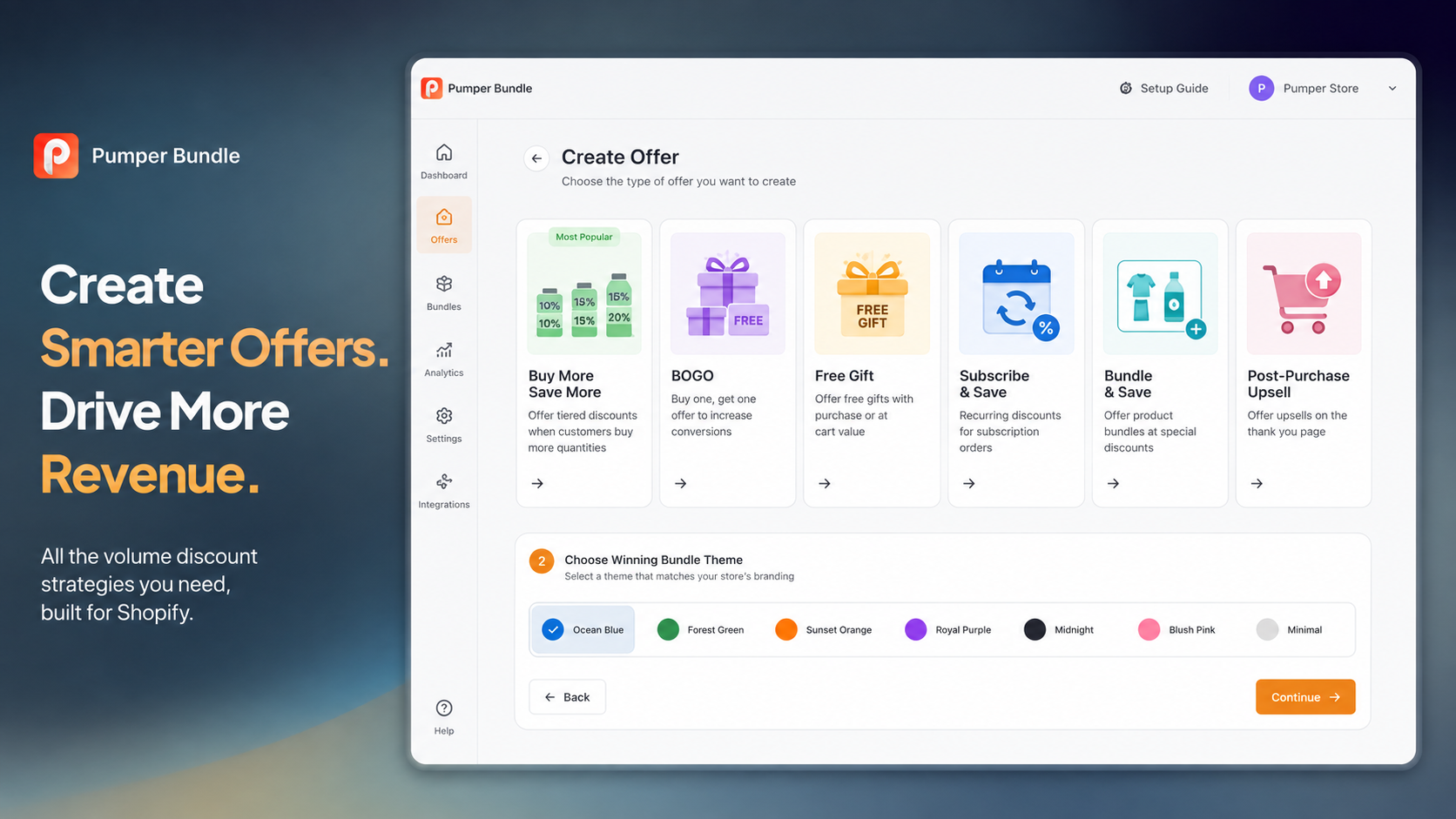
- Theme matching without custom CSS. Pumper Bundles, for example, includes a set of preset visual themes you pick before entering the offer editor, so the widget matches your brand without you touching a stylesheet.
- Combination discount controls, so you can decide whether your volume discount stacks with Shopify's native product, order, or shipping discounts, or whether it should always run alone.
- Per-offer analytics (often still labeled "beta" at this stage across the category), tracking impressions, add-to-cart rate, and actual extra revenue generated, not just a vague "AOV went up" summary.
Basic Setup Steps
- Pick your offer type based on your product's natural buying pattern (quantity breaks for consumables, bundles for complementary products, BOGO for gifting-friendly categories).
- Choose a visual theme that matches your storefront's existing color palette, so the widget looks native rather than bolted on.
- Set your tiers using the margin math above, not a round number that "feels right."
- Turn on the app embed and relevant theme extension block in your Shopify theme editor. This is the one manual step every app requires, since Shopify doesn't auto-activate extensions on install.
- Decide your combination discount settings, specifically whether this offer should stack with other active discounts on your store.
- Publish the offer on a small subset of products first, check the widget placement on both desktop and mobile, then roll out storewide once you're confident it renders correctly everywhere.
|
A ladder that stacks badly with a sitewide code quietly wipes the margin. Pumper handles that logic. Try Volume Discounts for Free Explore Pumper Bundles 2 min setup · No code required · Free plan |
Real-World Volume Discount Examples by Category
These are illustrative structures based on common patterns in each category. Use them as a starting template, then adjust against your own margin math.
1. Supplements and Consumables
A protein or vitamin brand selling a $32 monthly supply might run: 1 bottle at $32, 2 bottles at $58 (roughly 9% off per unit), 3 bottles at $81 (roughly 16% off per unit), nudging the customer toward a 2-3 month supply in one order. Because the product is consumed on a predictable schedule, the larger order doesn't just lift AOV once, it also delays the customer's next reorder decision, which is worth factoring into how aggressively you discount the top tier.
2. Apparel
A t-shirt brand at $24 per shirt might run BOGO at 50% off the second item rather than a flat percentage-off tier, since apparel shoppers respond well to the "buy for yourself, buy for a friend" framing. A three-pack bundle at a fixed price ($24, $42 for 2, $57 for 3) works as an alternative if BOGO doesn't fit the brand's positioning.
3. Beauty and Skincare
A skincare brand with a $45 serum might use a threshold-based free gift instead of a straight discount: spend $90 (roughly two items), get a free travel-size cleanser worth $12. This protects the perceived value of the hero product, since nothing on the page looks discounted, while still giving the shopper a clear reason to add a second item.
4. Candles and Home Goods
A candle brand at $19 per candle is a near-perfect fit for straightforward quantity breaks, since candles are low-consideration, low-risk purchases people are comfortable buying in multiples: 1 for $19, 2 for $34 (roughly 11% off), 3 for $46.50 (roughly 18% off), often positioned around gifting season when multi-candle purchases are already the norm.
|
Notice none of these four examples used the same structure twice. That's the point: the right offer type depends on your product, not on copying whatever your competitor is running. If you're not sure which of the six offer types fits your catalog, explore our industry guides to set up the right volume discount and bundle strategy.
|
Common Mistakes That Undercut Your Volume Discount
1. Discounting too early in the funnel
If your tiers are visible before the shopper has decided they want the product at all, you're training people to wait for a discount on their first purchase too, which trains your best customers to expect a lower price than you meant to offer.
2. Setting a third tier nobody actually wants.
A tier that requires buying five units of a $60 product is rarely realistic for most shoppers. If your top tier's average take rate sits in the low single digits, it's not adding value, it's just cluttering the widget and making the two realistic tiers harder to compare at a glance.
3. Letting the discount stack unintentionally.
If your volume discount is set to combine with a sitewide sale code by default, you can end up honoring a 35% total discount on a product priced for a 15% one. Check your combination discount settings every time you launch a sitewide promotion, not just when you first set up the tier.
4. Copying a competitor's tier structure without checking your own margin
A competitor's "buy 3, save 25%" might work for them because their landed cost is lower than yours, or their AOV lift covers it through free-shipping savings you don't have. Their tier percentage is not a benchmark for yours.
5. Ignoring mobile rendering
Clickpost's 2026 ecommerce benchmark roundup reports desktop AOV typically running 15-25% higher than mobile. Part of that gap is simply that tier widgets are harder to compare at a glance on a small screen. Test your widget on an actual phone before you publish, not just in your desktop theme editor's mobile preview.
Measuring Whether Your Volume Discount Is Actually Working
AOV alone isn't the metric. It's possible for AOV to climb while your actual profit per order stays flat or drops, if your discount tiers weren't priced against real margin. Track these four numbers together:
- Impressions and add-to-cart rate on the widget itself, so you know whether shoppers are even seeing and engaging with your tiers, not just whether AOV moved storewide (which could be driven by something else entirely, like a change in traffic mix).
- Cart-to-order rate, to catch cases where a tier is generating interest but not follow-through, often a sign the discount math looks confusing rather than compelling at checkout.
- Extra revenue attributable to the offer, meaning revenue above what the base order would have been without the tier, not total revenue on orders that happened to include a discounted product.
- Net margin per order, checked periodically against your worked-out tier math, so a discount that looked good on paper gets caught if real-world redemption patterns skew toward your most heavily discounted tier more than you planned for.
Most dedicated apps, including Pumper Bundles (whose analytics dashboard is currently in beta), surface these as a built-in view filtered by offer, date range, and status, so you're not stitching this together manually from your Shopify order exports every month.
|
Moving the AOV number and making money are not the same thing. Pumper Bundles reports both per offer. Try Volume Discounts for Free Explore Pumper Bundles 2 min setup · No code required · Free plan |
Advanced Tactics Once Your Basic Tiers Are Working
1. Layer a post-purchase upsell on top of your quantity breaks
A customer who just bought 2 units at your discounted tier price has already shown they're willing to spend more than the average visitor. That's a strong signal to show them a complementary product on the confirmation page, rather than treating the transaction as closed the moment they check out.
2. Translate your tier copy if you sell internationally
A "Buy 2, Save 15%" widget that only renders in English is leaving conversion on the table for non-English-speaking traffic. If your app supports it, auto-translating tier labels, savings text, and out-of-stock messaging per storefront language is a low-effort way to extend the same lift to every market you sell in.
3. Revisit your tiers every quarter, not once and forget it
Your landed costs change. Your competitors' pricing changes. A tier structure that made sense at your Q1 margin might be underpriced by Q3 if your shipping costs went up in the meantime. Treat your discount ladder as a living part of your pricing strategy, not a one-time setup task.
4. Don't run every offer type at once on every product
A product page with a quantity-break widget, a BOGO banner, and a threshold free-gift bar stacked on top of each other is confusing, not persuasive. Pick the structure that fits the product's natural buying pattern, and let it do its job cleanly.
Putting It Together
A volume discount is one of the few pricing moves that grows your average order value and your customer's sense that they got a good deal, at the same time. The mechanics aren't complicated. Pick a structure that matches how your product actually gets bought, price the tiers against your real margin instead of a number that looks clean, and put the comparison where the shopper is actually making the decision, on the product page, not buried in a cart drawer they might not open.
Start with one product category, run the tier math from this guide against your own numbers, and give it a full month before you judge the results. If you want the setup handled through one dashboard rather than stitched together across apps, Pumper Bundles covers all six offer types this guide walks through, quantity breaks, BOGO, free gifts, subscribe and save, bundles, and post-purchase upsells, backed by a 7-day free trial and a money-back guarantee if it's not the right fit.
Get started with your first Shopify volume discount!
Frequently Asked Questions
Do volume discounts actually increase profit, or just revenue?
They can do both, but only if the tiers are priced against your real margin rather than a round percentage that looks appealing. The worked example earlier in this guide shows how total gross profit per order can still climb at every tier even as per-unit margin shrinks, as long as the tier is built on actual landed cost, not list price.
What's the difference between a volume discount and a coupon code?
A coupon code typically applies the same percentage regardless of quantity, and the shopper has to know it exists and enter it. A volume discount is quantity-aware, visible on the product page before checkout, and requires no code entry, which removes a friction point that causes some shoppers to abandon rather than go hunt for a discount code.
Can I run a volume discount and a sitewide sale at the same time?
Yes, but you need to explicitly decide whether they stack. Most dedicated apps let you toggle whether your volume discount combines with Shopify's native product, order, and shipping discounts. Leaving this on by default during a sitewide promotion is one of the most common ways merchants accidentally give away more margin than intended.
How many tiers should I offer?
Two to four tiers covers the vast majority of use cases well. A fourth tier is worth testing only if your product genuinely gets bought in bulk (a 6-pack of a low-cost consumable, for example) and even then, check your actual tier 4 take rate before assuming it's earning its place on the page.
Do I need a developer to set up Shopify volume discounts?
Not with a dedicated app built on Shopify's Theme App Extensions. You configure tiers, pricing, and widget placement through a visual dashboard, and the widget gets injected onto your product pages without any theme code changes. Native Shopify discount codes also require no developer, but they won't display a visual tier comparison on the product page itself.